

A construction estimator directory won’t calculate quantities, and estimating software won’t build your professional network. The directory serves a different purpose: it helps you present your skills and connect with people across the industry, while dedicated tools support the work behind each estimate.
Choosing a toolkit can feel complicated because takeoff, pricing, document review, and project communication each have different demands. Manual steps and scattered information can slow work down, but no single tool needs to do everything.
This guide compares tools by task, explains how software differs from a professional directory, and outlines a practical way to assess your workflow. Constructology 101’s interactive listings, project sharing, and messaging can support visibility and industry connections alongside your estimating tools. Use each tool for the work it does best, from preparing an estimate to staying connected with the people involved in construction projects.
Key Takeaways
- Match estimating tools to the job, from measuring quantities to organizing pricing inputs and reports.
- Compare options by drawing compatibility, collaboration, reporting, and learning needs, not by feature count alone.
- Review your workflow and trial tools against a representative project before building your toolkit.
- A construction estimator directory supports professional discovery and visibility, complementing rather than replacing estimating software.
- Use an interactive listing to present your skills and services to construction industry peers.
Construction Estimator Directory and Software Tools: What Each One Does
Estimators manage more than numbers. They measure quantities, organize labor and material pricing inputs, communicate drawing changes, and help teams find relevant professional expertise. These tasks call for different tools, rather than one platform expected to cover the entire workflow.
Takeoff software measures quantities; estimating software organizes costs and bid information; professional directories help people find and connect with industry specialists. A directory complements estimating tools. It doesn’t measure quantities or calculate bids.
What belongs in a construction estimator’s toolkit?
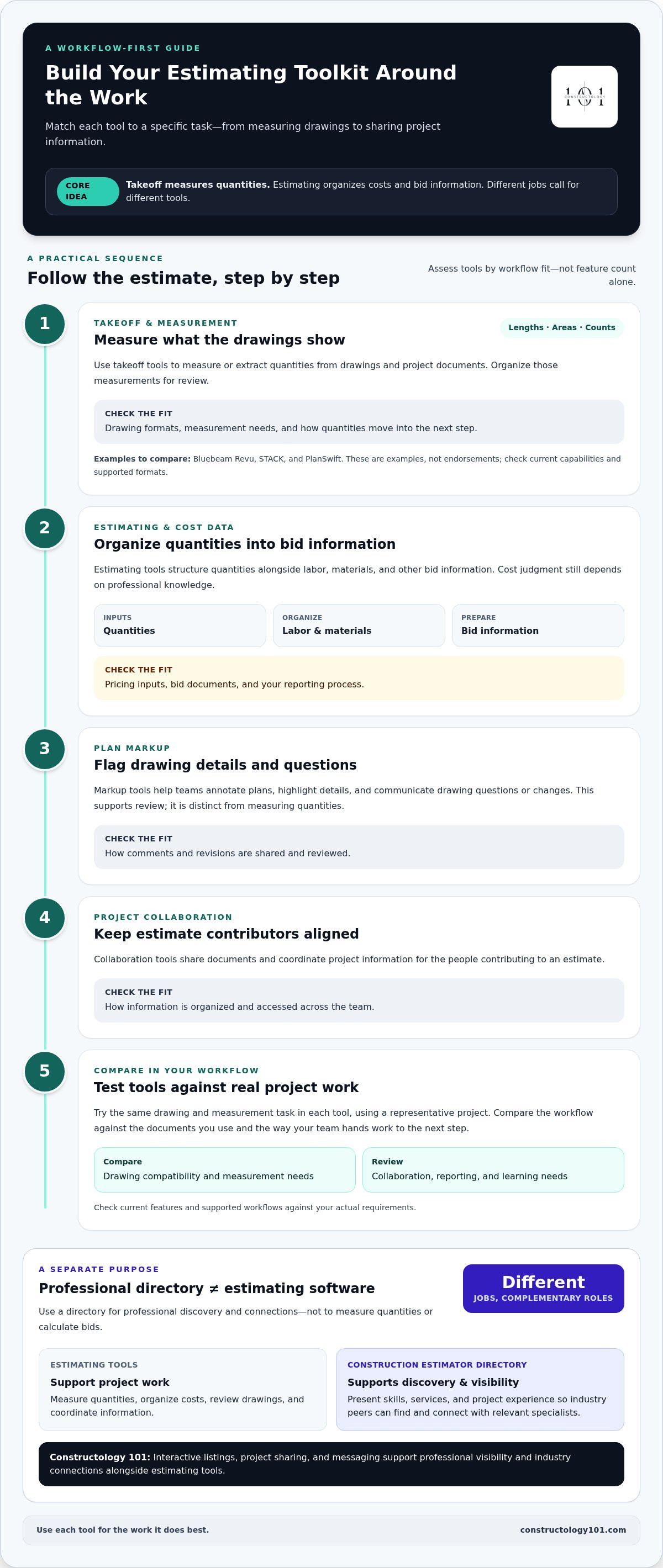
Start with the work itself. Takeoff tools help measure quantities from drawings and project documents, such as areas, lengths, and counts. Estimating tools help organize those quantities alongside labor, materials, and other bid information. The right setup depends on the project and how you prepare estimates.
Communication tools serve another purpose. Document markup can help teams annotate plans, flag questions, and share drawing changes. Collaboration tools help keep relevant project information accessible to the people contributing to an estimate. Together, these tools support a workflow from measurement through review.
Cost judgment still relies on professional knowledge. The expert knowledge of construction costs associated with quantity surveying offers useful context for understanding how measurement, cost planning, and estimating responsibilities relate.
What does a construction estimator directory help you do?
A construction estimator directory helps project teams discover estimators and related specialists by making professional information easier to find. A useful listing communicates your skills, services, and project experience, so others can understand your areas of focus before starting a conversation.
That visibility serves a different purpose from estimating software. Software supports project work; a directory supports professional discovery and relationship-building around that work. Constructology 101 combines interactive listings with project sharing and messaging, helping construction professionals present their capabilities and connect with others in the industry.
Build a clear profile around the work you do and the experience you bring. This guide to a national construction directory offers more context on directory selection and business visibility.
The Main Types of Tools for Construction Estimators in 2026
Choose tools according to the work they support. A measurement application, a cost-estimating platform, and a document collaboration tool solve different problems, even when they all contribute to the same bid. Knowing the role of each category makes it easier to see where a tool fits.
Digital takeoff measures what’s shown in project documents; cost estimating turns those quantities into a priced bid. Plan markup adds another layer by helping teams flag details and communicate drawing questions.
| Tool category | Primary task | Typical user | Workflow consideration |
|---|---|---|---|
| Takeoff and measurement | Measure or extract quantities from drawings | Estimators and trade specialists | Check drawing formats, measurement needs, and how quantities move into the next step. |
| Plan markup | Annotate drawings and highlight details | Estimators and project teams | Consider how comments and revisions are shared and reviewed. |
| Estimating and cost data | Organize quantities, labor, materials, and bid information | Estimators and preconstruction teams | Look for a fit with your pricing inputs, bid documents, and reporting process. |
| Project collaboration | Share documents and coordinate project information | Teams contributing to an estimate | Review how information is organized and accessed across the team. |
| Professional directory | Support discovery and professional connections | Estimators, firms, and project teams | Use a clear listing to present relevant skills and experience. |
Takeoff, measurement, and plan-markup tools
Digital takeoff helps estimators measure lengths, areas, or counts from project drawings, then organize those measurements for review. Plan markup supports a related but distinct task: annotating documents to call attention to details or questions. Bluebeam Revu, STACK, and PlanSwift are examples to consider in these categories, not endorsements. Compare their current capabilities and supported formats with the documents you use.
Suitability depends on the drawings you receive, the quantities you need, and how your team reviews its work. A tool that suits one estimator’s measurement process may not match another team’s file formats or handoff needs. When comparing options, try the same drawing and measurement task in each tool so the workflow is easier to assess.
Estimating, cost data, and project collaboration tools
Estimating platforms help structure quantities alongside labor, materials, and bid documentation. Collaboration tools focus on sharing documents and coordinating project information, supporting review across contributors. Map each tool to a specific workflow step instead of assuming one platform covers every need. Check current features and supported workflows against your actual requirements.
Directories address a different job: helping professionals become discoverable. For example, the RICS offers a directory of chartered quantity surveyors. A construction estimator directory listing can also help present your services and skills while supporting industry connections.
How to Compare Construction Estimating Tools by Workflow
Start with the work your tool needs to support, then compare options against your actual project process. Prioritize task coverage, drawing compatibility, collaboration, reporting, and learning needs. A long feature list matters less than a clean fit with the way estimates move from measurement to review and handoff.
Separate must-haves from optional features. Supported drawing formats and the ability to produce the reports your team uses may be essential. Automation or advanced integrations may be useful, but only when they address a real workflow need. Write down your requirements before comparing products to keep attention on the problems you need to solve.
| Category | Example tools | Compare for |
|---|---|---|
| Takeoff and measurement | Bluebeam Revu, STACK, PlanSwift | Drawing support, measurement functions, and quantity handoff |
| Estimating | Estimating platforms, structured spreadsheets | Organization of labor, materials, quantities, bid details, and reports |
| Document collaboration | Shared document workspaces and markup tools | Revision handling, comments, access, and review steps |
| Professional discovery | Construction directories and professional networks | How clearly skills, services, and experience are presented |
These are categories, not rankings or endorsements. Product features and supported workflows can change, so consult current product documentation to confirm what each named example does before adopting it.
Which tool fits a solo estimator, trade contractor, or estimating team?
A solo estimator may need a straightforward path to measure drawings, organize pricing inputs, and keep bid documents in order. Trade contractors should focus on the quantities and cost details specific to their work, rather than assuming a general tool will match every specialty. Teams should also assess shared access, consistent document versions, and clear handoffs between measurement, pricing, and review roles.
What should estimators check before adopting a tool?
Test the tool against a representative project. Review supported drawing files, data export options, integration claims, onboarding needs, and how estimates are shared and reviewed. Compare the steps with your existing process, then identify what the tool would replace or add. Don’t assume a feature guarantees greater accuracy, savings, or bid wins. Those outcomes depend on the work and how the tool is used.
Keep professional discovery separate from estimating operations. A construction estimator directory can help others find and learn about your services, but a listing does not replace takeoff or estimating software. For professional development and industry connections, the American Society of Professional Estimators (ASPE) is another resource to consider alongside the tools that support your project workflow.
A Practical Process for Building Your Estimating Toolkit
Build around the work you do, not a feature checklist. A clear process helps you spot wasted steps, test tools against real documents, and keep estimating software separate from professional discovery goals.
Map the estimating process before comparing software
First, list recurring tasks, current bottlenecks, and the documents involved in each estimate. Note where drawings, quantity notes, pricing inputs, and bid files move between estimators, specialty trades, suppliers, and project teams. Keep networking needs separate: finding professional connections is different from measuring or pricing work.
Use this sequence to shape your toolkit:
- Review the workflow. Trace an estimate from receiving project documents through measurement, pricing, review, and submission.
- Identify the friction points. Record repeated manual entry, unclear handoffs, or difficulty locating the right document version.
- Set must-have criteria. Choose requirements based on your actual drawings, outputs, team roles, and review process. Keep optional features separate.
- Test with a representative project. Use familiar plans and realistic tasks to see how measurement, estimating, and collaboration tools work together.
- Adopt and review. Agree on file practices and handoffs with the team, then revisit the toolkit as project needs and processes change.
Test the workflow and refine the toolkit
For example, when preparing a renovation estimate, an estimator could measure areas and counts from the drawings, organize quantities with labor and material inputs, then share marked-up plans and estimate documents for review. Test whether measurements can be transferred or entered cleanly, whether reviewers can follow revisions, and whether the final outputs fit existing bid procedures. A tool’s value depends on how well it supports your workflow, not on a promise of universal savings or accuracy.
Use a simple checklist: Does it handle our project documents? Can we review and share its outputs? Does it fit our team’s handoffs? Is the learning effort practical for the tasks it supports? Answer according to your own priorities, since solo estimators, trade contractors, and larger teams may need different setups.
Collaboration also depends on the people involved, not only the software. This guide to finding reliable construction partners can help you consider how project relationships fit your process.
A construction estimator directory can support professional visibility and connections, but it doesn’t replace takeoff or estimating tools. An interactive construction professional listing gives you a place to present your skills and services alongside the tools you use.
Use a Construction Estimator Directory to Build Industry Connections
Estimating software supports project work. A directory supports professional visibility, discovery, and relationship-building. An interactive construction estimator directory gives peers and project teams a way to learn about your skills and services. Dedicated tools remain responsible for measuring quantities and organizing estimates.
What makes a construction estimator listing useful?
Make your listing clear and specific. Describe the services you provide, highlight relevant estimating skills, and include project experience that helps others understand your focus. Accurate details make it easier for peers and potential collaborators to see where your expertise may fit. This overview of interactive directory listings explains how directory-based discovery works.
Keep the profile aligned with your current work. Use plain language to describe your specialties and the kinds of projects you’ve supported. A focused profile gives people a useful starting point for a conversation without suggesting that a listing itself performs estimating work or guarantees new business.
How Constructology 101 fits alongside estimating software
Constructology 101 is a construction-industry directory and professional network, not estimating software. Its interactive listings help professionals present their services and skills. Project sharing and integrated messaging support connection and communication among construction professionals. These functions complement estimating tools: the directory supports how you’re discovered and connect, while estimating tools support the estimating tasks themselves.
Use each for a clear purpose. Keep your estimating workflow in tools suited to measurement, pricing, and bid preparation. Use a directory listing to make your professional focus visible, then use project sharing and messaging to share information and build industry relationships.
Explore Constructology 101 to see how an interactive listing can fit alongside the tools you already use.
Build a Toolkit That Works and a Network That Grows
Strong estimating workflows rely on tools chosen for the tasks at hand. Match takeoff, estimating, and collaboration tools to your documents, handoffs, and reporting needs, then test them against real project work. The right combination depends on your workflow, not a universal software checklist.
A construction estimator directory serves a different purpose. It helps you present your professional skills and services, build visibility, and connect with industry peers. Constructology 101 brings interactive directory listings together with project sharing and integrated messaging, so your professional presence can complement the software you use to estimate.
Pioneer Membership gives early participants a lifetime deal and access to the platform’s networking tools, project sharing, and messaging. Explore Constructology 101 and build your construction industry connections.
Frequently Asked Questions
What tools do construction estimators use?
Construction estimators use different tools for measurement, costing, document review, and communication. Takeoff tools measure quantities from plans; estimating tools organize those quantities with labor, materials, and bid inputs. Plan-markup tools help annotate drawings, while collaboration tools support document sharing and coordination. The right mix depends on project type, team size, and workflow. A construction estimator directory has a separate role: it supports professional discovery, not estimating calculations.
What is the difference between construction takeoff software and estimating software?
Takeoff software helps measure quantities shown in plans, such as lengths, areas, or counts. Estimating software helps organize those quantities with cost inputs like labor and materials, then structure bid information. Some platforms combine measurement and estimating functions, while others focus on one task. Software doesn’t guarantee accuracy. Estimators still need to review quantities, use sound project information, and check that assumptions align with the documents.
Can a construction estimator directory replace estimating software?
No. Estimating software supports calculations, quantity organization, and bid documents; a directory supports professional discovery and networking. Estimators may use both, but for different purposes. Constructology 101 is an interactive directory and professional network, with listings for presenting services and skills, plus project-sharing and messaging features. It helps professionals connect around their work, but it doesn’t perform takeoffs or calculate estimates.
How do I choose construction estimating tools for my business?
Start by mapping your current tasks and identifying workflow gaps. Check whether tools support the drawing formats you use, provide suitable export options, and meet your collaboration needs. Compare them using representative project documents and the steps your team follows to review and share estimates. Focus on requirements that matter to your work rather than universal rankings. Before deciding, verify current product features and supported workflows in the provider’s documentation.
What should a construction estimator include in a directory profile?
Include a clear description of your services, specialty areas, relevant skills, and specific project experience. Accurate details help industry peers understand your focus and assess whether your expertise may fit their needs. Keep the information current and use plain language. A complete profile supports professional discovery, but it doesn’t promise leads or contracts. Any working relationship, project decision, or next step remains between the professionals involved.
Are free construction estimating tools enough for professional work?
They may suit some workflows, but fit depends on project complexity, required functions, and the tool’s current capabilities. Check file support, measurement and estimating features, collaboration needs, and the outputs your process requires. Then test the tool against representative project documents before relying on it for live work. Don’t assume a free option will meet every estimator’s needs; compare its limits with your actual requirements.


