

A construction portfolio can show impressive work and still miss the details that make it convincing. The best practices for online construction portfolios include using clear photos from varied angles, capturing close-ups of fine workmanship, removing identifying details that could expose workers or a jobsite, and refreshing project selections regularly. Together, these steps make your work easier to assess and your portfolio more professional.
Good project photos matter, but presenting quality takes more than taking attractive pictures. You also need to show finishing details, protect privacy, and replace older content that no longer represents your work. This article covers four practical steps: take stronger construction photos, highlight craftsmanship, protect identifying information, and keep portfolio content current. Use them to present completed work clearly and give visitors a useful picture of what your team can do.
Key Takeaways
- Frame project photos to keep workers’ faces, company identifiers, and location clues out of view.
- Review your portfolio regularly and add recent work so it reflects your current capabilities.
- Use clear, well-lit photos from varied angles to help visitors understand each project.
- Include close-ups of finishes and construction details to make skilled workmanship easier to see.
1. Avoiding identifiable faces and company logos in photos
Choose a website platform that lets you organize project galleries, edit captions, and control which details appear publicly. A content management system or website builder can group projects by type and location. The best practices for online construction portfolios include making every project page clear and easy to maintain, so visitors can focus on the work.
Before publishing photos, plans, or client details, get approval from the relevant people and organizations. Agree on which materials can appear and what information may accompany them, then keep a record of the approval with the project files. This helps your team avoid sharing private details unintentionally.
Inspect each image at full size before uploading it. Look for faces, badges, hard hats, vehicle doors, site boards, and plans that reveal names or contact details. A worker’s silhouette can show scale and activity while keeping faces and identifying marks out of view.
Outdoor photos need a location review, too. Scan the frame for street signs, billboards, and recognizable project names. Crop identifying details when doing so won’t hide important work. Check filenames, captions, and image metadata as well, since text can reveal a site even when the image looks anonymous.
For local search visibility, use accurate project titles and describe the work and location at an appropriate level. Add concise image descriptions and keep business details consistent across platforms. Avoid publishing a precise address or client name when it could identify a private site. These steps support discoverability without exposing unnecessary information.
Common mistakes include leaving a logo in the background, sharing unapproved plans, or using a revealing caption. Weak passwords and outdated website software can also create security risks. Limit publishing access to authorized team members, use strong, unique passwords, and review portfolio pages regularly. A privacy-focused approach is one of the best practices for online construction portfolios because it protects people and project information while presenting your work professionally.
Choose a content management system or website builder that lets you organize project galleries, edit captions, and control which details appear publicly. Make sure it keeps project pages clear and easy to maintain.
2. Continuous portfolio monitoring and adjustment
Schedule recurring reviews and assign one person to assess each project page. Check for outdated status details, broken links, missing files, and descriptions that no longer match the finished work. When a renovation is complete, for example, replace progress notes with a clear completion summary. Regular portfolio management keeps the site aligned with your current capabilities and business strategy. These are practical best practices for online construction portfolios, not one-time setup tasks.
Make pages usable on phones, with readable text, clear navigation, keyboard access, and controls that work with touch. Compress large image files and remove unnecessary elements to support faster loading. Review the experience on phone and desktop screens, then fix barriers that make project details difficult to access.
Present budgets, timelines, and results with enough context to explain what each figure represents. Identify the project scope and time period, and distinguish completed results from estimates. For instance, explain whether a timeline covers a specific phase or the full project. Share only figures approved for public use.
Update the portfolio when a project reaches a useful milestone, such as completion. Construction companies can add one or two projects per quarter. There’s no universal ideal project count: select work that reflects your current services and goals, and remove entries that no longer fit. Consistent updates are another of the best practices for online construction portfolios.
Use a short review checklist: Is the project status current? Do the summary and page links work? Does the content match the completed work? Record issues, assign an owner, and track fixes. A shared process helps your team maintain quality without relying on memory.
Use visitor feedback and site analytics to guide improvements. If visitors leave a project page quickly, assess its title, opening content, and loading performance. Record each change and review its effect over time. Keep adjustments responsible and focused on helping visitors find relevant construction work.
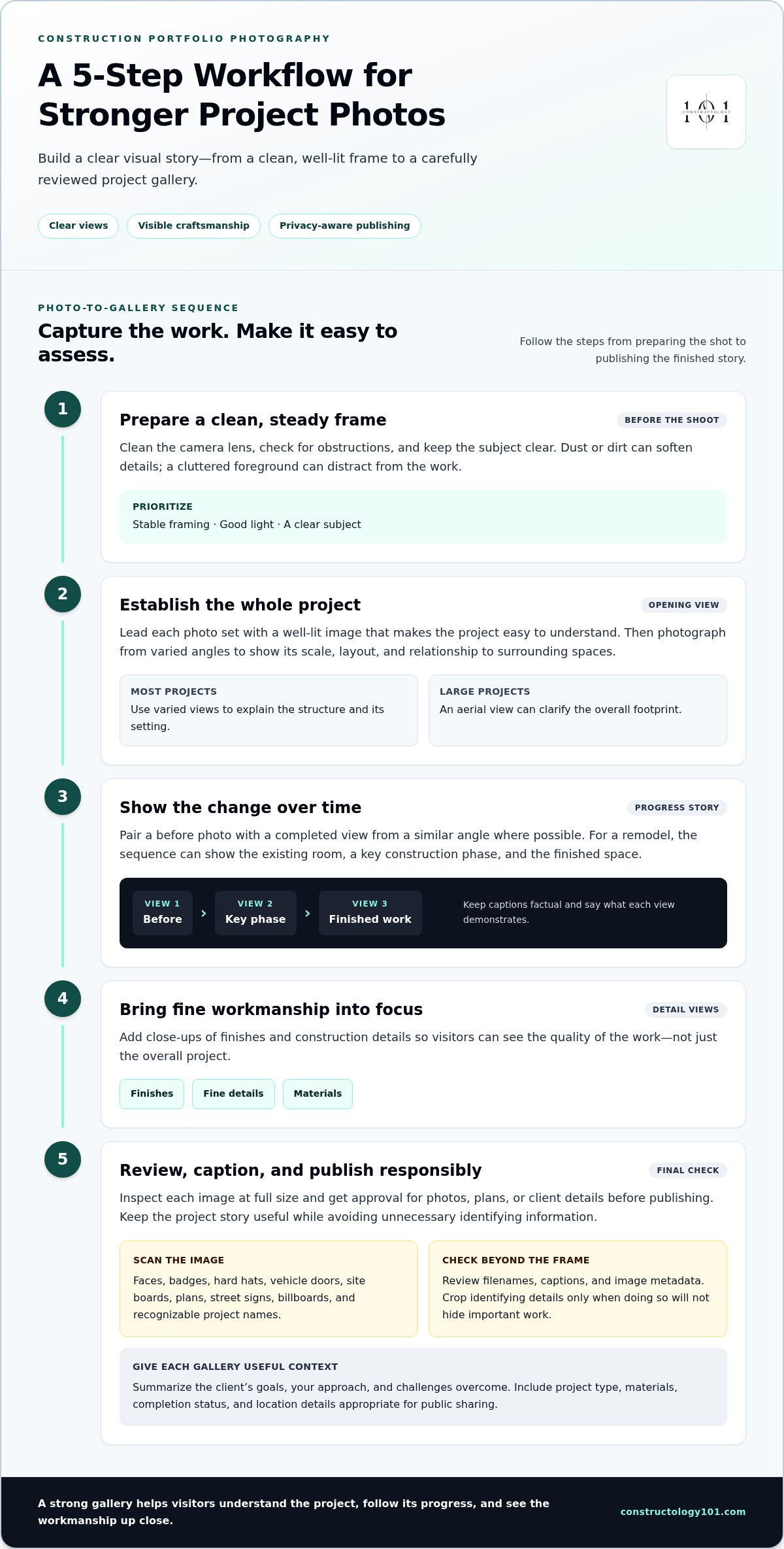
3. Photographing construction work
An effective portfolio pairs project photographs with a concise summary of the client’s goals, your approach, and the challenges your team overcame. Include useful context, such as project type, materials, completion status, and location details suitable for public sharing.
Start each photo set with a well-lit image that makes the project easy to understand. Then capture the structure from varied angles, showing its scale, layout, and relationship to surrounding spaces. For a large construction project, an aerial view can explain the overall footprint more clearly than ground-level images alone.
Before taking photos, clean the camera lens and check the frame for obstructions. Dust or dirt on the lens can soften details, while a cluttered foreground can distract from the work. A newer smartphone can take effective portfolio photos, so focus first on stable framing, good light, and a clear subject.
Show progress as well as the finished result. Pair a before photo with a completed view from a similar angle, where possible, so visitors can see the change. For example, a remodeling gallery might show an existing room, a key construction phase, and the finished space. Keep captions factual and identify what each view demonstrates.
Organize galleries by project type, such as residential, commercial, remodeling, infrastructure, or specialty work. Add location information only at a level appropriate for sharing, and group projects consistently so visitors can compare relevant work. Give each project its own page or gallery, with a descriptive title and a short explanation of its function and outcome.
Photographs should also reflect how the crew works on site. Include views that show orderly work areas and appropriate safety practices, without making claims the image cannot support. Together, clear photos and practical context offer useful insights into your construction projects and help visitors understand the investment of skill behind the result.
Consistency across images makes a project easier to assess. Use high-quality, well-lit photographs from multiple angles, and include an aerial or drone view when it helps convey a large-scale site. Check that the camera lens is clean; a newer smartphone can be sufficient. Choose perspectives that show the team following occupational health and safety standards.
4. Capturing fine workmanship details
Show safety, quality, and compliance through specific project evidence, not broad claims. Include images of orderly work practices and finished details, then describe documented quality checks accurately. A photograph can illustrate visible work, but it can’t establish compliance by itself.
Move closer to the features that distinguish careful execution. Photograph a clean tile edge, an even finish, a roofing transition, or a precise joint. Keep the camera steady and the detail in focus. Include enough surrounding context for viewers to understand where the feature sits within the project.
Build each project gallery around a clear sequence: an overall view, a close-up, and the finished result. For example, pair a roof overview with a detail of the completed edge and a wider image showing how it integrates with the structure. This sequence helps visitors assess both the craftsmanship and its function.
Use captions to explain what each detail demonstrates. Name the material or feature when appropriate, and describe your team’s approach without making unsupported performance claims. If you show a finish before and after work, use comparable angles and lighting so the change is clear.
Connect images to useful project reporting. A short note can explain the scope, quality checks completed, or a challenge your team addressed. Keep private client information out of captions. If internal software or dashboards track inspection notes, use approved public-facing details rather than screenshots that expose project records.
Choose details that reflect the work you want to develop further. A specialty trade might lead with its most precise installation, while a remodeling firm could feature transitions between old and new materials. Consistent image selection makes it easier to organize galleries purposefully and helps visitors compare relevant capabilities.
Turn these details into stronger professional visibility by sharing your construction expertise with industry professionals.
Choose close-up portfolio photos that demonstrate precision in finishing, roofing, and other work. Keep each image focused on the workmanship, with enough context to show how the detail fits into the project. Review images and captions before sharing, and avoid personal data, company names, contact details, identifying project names, and links that could reveal the company.
Use lessons-learned processes to record the causes of variances and issues, corrective actions, and recommendations for future projects and portfolio updates. These records can guide which details to document and help teams carry useful observations into later work, while public-facing project material stays focused on the craftsmanship.
Constructology 101: Interactive Directory Listing
Constructology 101’s Interactive Directory Listing gives construction professionals a place to be discovered and connect with others across the industry. After refining your portfolio, use a directory presence to help relevant professionals find your business, share project information, and build industry relationships.
The platform serves a broad construction community, including architects, engineers, specialty trades, and suppliers. It can complement your own portfolio when you want to extend your professional visibility and connect beyond your website. Pioneer membership is also available at a lifetime price.
Explore Constructology 101 to see how its directory and professional network fit your next step. Visit Constructology 101 to learn more.
Put your next project in view
Your portfolio can do more than document completed work. Treat it as an active introduction to the standards, judgment, and capabilities you bring to future opportunities. As you choose what to publish next, consider which project best represents the work and professional relationships you want to build. A clear, current presentation helps visitors understand your strengths and gives them a reason to continue the conversation.
Make your next update purposeful. Select a project, shape its story, and share it where construction professionals can discover your work. Applying the best practices for online construction portfolios is an ongoing process, not a one-time website task. Keep building on each improvement and let your online presence grow alongside your work.
Contact Constructology 101 today to explore how it can support your professional visibility. Take the next step with confidence.
Frequently Asked Questions
How should construction projects be photographed and presented in a portfolio?
Plan each photo set around what a prospective client needs to assess. Before the site visit, note the project’s defining features and prepare a shot list, such as entry conditions, structural connections, or material transitions. Choose images that answer those questions, then sequence them so the project’s purpose is clear. Add concise captions that distinguish your team’s contribution from the wider project.
What website platforms are best for construction company portfolios?
Choose a content management system or website builder that lets you organize project galleries, edit captions, and control which details appear publicly. Make sure it keeps project pages clear and easy to maintain.


