

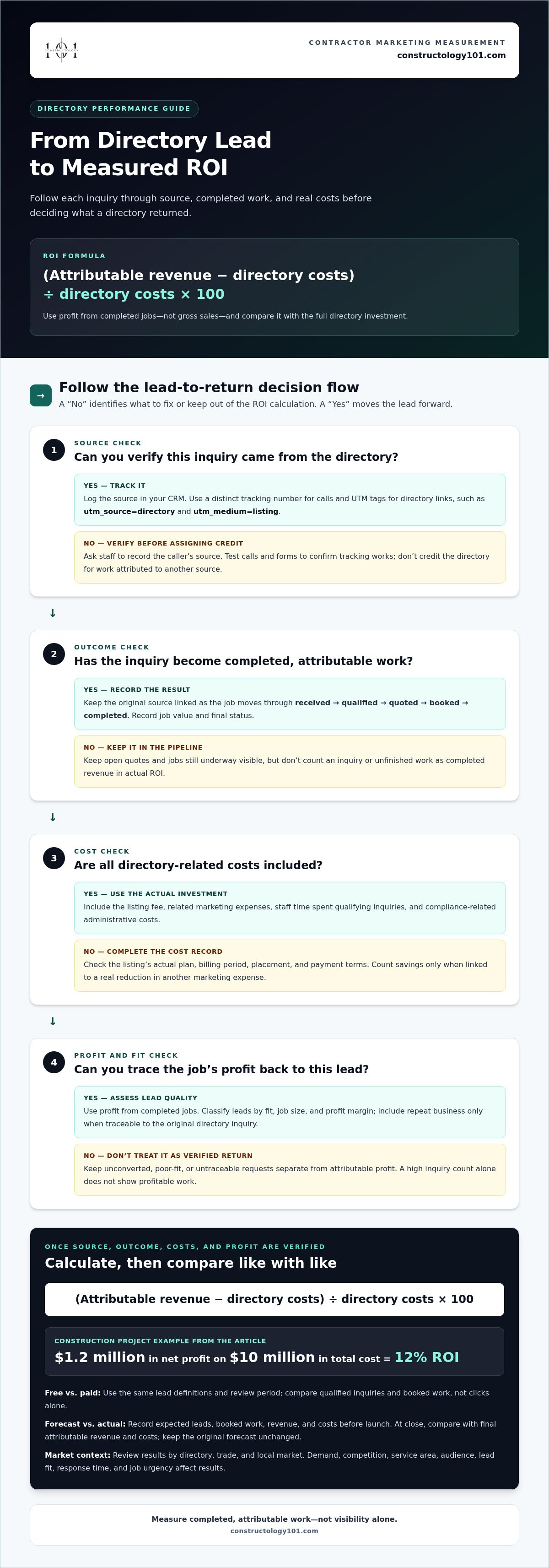
A directory listing should be measured by the profit it helps bring in, not by how visible it looks. Measuring ROI of online directories for contractors starts with this formula: (revenue attributed to the directory minus directory-related costs) ÷ directory-related costs × 100. Track calls, form submissions, and booked jobs back to the listing so you can compare the return you expected with the result you actually earned.
Counting inquiries is easy; seeing which ones become profitable work takes a consistent process. This guide shows you how to track leads by source, connect booked jobs to revenue, include relevant costs, and assess less tangible benefits such as stronger industry connections. Use these steps to understand each directory’s value and decide where to focus your business development efforts.
Key Takeaways
- Calculate directory ROI by comparing the profit attributed to it with the costs of the listing and related marketing.
- Track calls, form submissions, and booked jobs by source to see which inquiries turn into revenue.
- Compare projected returns with final costs and revenue, then use the gap to improve future estimates.
- Consider relationship-building and visibility alongside direct profit when assessing a directory’s broader value.
ROI as a measure of profit relative to investment cost
When measuring ROI of online directories for contractors, compare attributable profit with the full investment. Separate listing expenses, marketing costs, and verified savings before deciding whether the return supports your goals.
-
Compare Free and Paid Listings
Compare free and paid directory listings using the same lead definitions and review period. A free listing has no listing fee; a paid listing adds a direct expense. Track qualified inquiries and booked work for both. Compare completed jobs rather than clicks alone, and don’t assume free exposure will produce profitable leads.
-
Calculate Listing Costs and Savings
Record the actual listing fee and related marketing expenses, then compare them with attributable profit. Costs depend on the listing’s plan, billing period, placement, and payment model, so use its actual terms rather than an assumed average. Count savings only when you can link them to a real reduction in another marketing expense.
-
Factor Lead Quality Into Profit
Classify leads by fit, job size, profit margin, and whether they become booked work. Use profit from completed jobs, not gross sales, to calculate return. Include repeat business only when you can trace it to the original directory inquiry. This helps distinguish a few valuable projects from many poor-fit requests.
- Compare directory visibility by trade and market. Demand, competition, service area, and audience all affect exposure and lead costs. Track each trade and market separately to see where inquiries become suitable work.
- Before paying, review the contract length, renewal and cancellation terms, and lead-credit policies. Check what qualifies for a credit, how to claim it, and whether cancellation requires notice. These details affect your total investment and ability to manage risk.
- Calculate ROI as (attributable revenue minus directory costs) ÷ directory costs × 100. For measuring ROI of online directories for contractors, use this result alongside verified savings and qualified leads. A construction project with $1.2 million in net profit on $10 million in total cost has a 12 percent ROI.
Tracking calls, form fills, and booked jobs
Use one source-tracking process from the first inquiry through completed work. Link each directory lead to its outcome and associated campaign costs.
-
Set Up Call and Form Tracking
Assign a distinct tracking number to each directory campaign and log calls from that source in your CRM. Add UTM tags to directory links, such as utm_source=directory and utm_medium=listing, so form submissions include campaign details. Ask staff to record the source when callers haven’t used a tagged link. Test calls and forms to confirm they’re recorded correctly before reviewing results.
-
Record Booked Jobs and Conversions
Move every inquiry through consistent CRM stages: received, qualified, quoted, booked, and completed. Record the job value and final status against its original source, including leads that don’t convert. No single conversion rate fits every contractor directory campaign: trade, location, lead fit, response time, and job urgency all affect results. Compare similar lead types to calculate a useful rate for your business.
-
Track Progress and Campaign Costs
Link the original lead record to job milestones, such as estimate accepted, work started, and project completed. This distinguishes booked work from finished work and helps reveal the time between inquiry and revenue. Log campaign expenses alongside job-related costs, including staff time spent qualifying directory inquiries. Record compliance-related administrative costs in the same place, using consistent categories to compare campaigns accurately.
- Review CRM reports by directory, trade, and local market. Separate calls, forms, qualified leads, and completed jobs to spot where prospects drop away. Keep attribution consistent across campaigns, and avoid crediting a directory for work that came through another source. A construction industry directory listing can be assessed with this same source-and-outcome tracking process.
Consistent attribution helps contractors track marketing ROI by channel. To compare channels accurately, track the revenue and costs of each marketing stream separately, assigning results and spending to the relevant channel.
Anticipated ROI versus actual ROI
Set a forecast before each directory campaign, then compare it with the final results. Keep assumptions visible so each difference points to a possible adjustment.
- Before launch, estimate attributable revenue, costs, and conversion assumptions. Anticipated ROI is based on estimates made before a campaign starts, so record expected lead volume, likely booked work, and costs in one forecast. Name each metric and its source, such as CRM leads or campaign invoices. This gives you a clear baseline rather than relying on memory later.
- Separate assumptions from confirmed results. Projected revenue, for example, depends on which inquiries become jobs and the value of that work. Label estimates as forecasts, not earned revenue. Keep the forecast unchanged during the measurement period and record later adjustments separately. This preserves a fair comparison between the original plan and the campaign’s final performance.
- At campaign close, calculate actual ROI using final revenue and costs. Actual ROI is typically calculated after a project concludes, when final amounts are available. Include completed, attributable work, not every inquiry or open quote. If a job is still underway, keep its status visible and include it in a later close-out.
- Compare forecast and actual figures side by side. At $3 per bar, projected revenue is $3,000, net profit is $900, and anticipated ROI is 42.9%. If the store instead pays $2.25 per bar, actual revenue is $2,250, net profit is $150, and actual ROI is 7.14%.
- Use each difference between forecast and result to improve the next forecast. For a directory campaign, identify whether lead volume, job value, close rate, or final cost differed from expectations. Update that assumption and retain the previous metric so future comparisons show whether the change improved results.
Considering intangible benefits
Record relationship value separately from booked revenue. An industry introduction, for example, may create future opportunities without producing immediate profit.
- Track visibility through actions, not impressions alone. Record directory profile views alongside inquiries, qualified conversations, and referral introductions. Compare these signals over the same period. More views without meaningful conversations indicate exposure, not proven business value. Keep this distinction clear when assessing whether visibility supports your growth goals.
- Log each new relationship and its next step. Note who made the introduction, the project or skill area involved, and whether follow-up occurred. For example, an architect’s introduction to a specialty trade could lead to a future collaboration. Count the connection as a potential benefit, but recognize revenue only when attributable work is completed.
- Measure trust through repeat engagement. Track referrals, repeat customers, and returning professional contacts by source. The construction industry’s customer retention rate is 80%, but that figure doesn’t show what any directory caused. Use it as context, then compare your own customer retention before and after directory participation without assigning unrelated repeat work to the listing.
- Assess whether connections improve project coordination. Early alignment among project teams has been associated with cost performance 6.5% below budget. Record cases where a directory introduction helped bring relevant professionals into early discussions. Don’t claim the directory created savings unless project records connect that introduction with a specific cost outcome.
- Build a simple intangible-benefit scorecard with four fields: visibility, new relationships, referrals, and coordination. Review each field alongside financial ROI, and note evidence such as a documented introduction or repeat inquiry. Use the findings to guide your next networking step. Explore construction industry connections and consider which relationships could support your next project.
Constructology 101: Interactive Directory Listing
Constructology 101 offers an Interactive Directory Listing for construction professionals who want to be discovered and build industry connections. Use the tracking approach from this guide to assess whether a listing supports your visibility, inquiries, and business relationships.
The directory serves a broad construction community, including architects, engineers, specialty trades, and suppliers. Members can share project information and communicate through integrated messaging, making it relevant when you’re looking to connect with professionals beyond immediate customer leads. An Interactive Directory Listing can support discovery, while the Pioneer membership offers a lifetime membership option.
Consider Constructology 101 when your next step is expanding your presence in a construction-focused professional network. Visit Constructology 101 to explore the Interactive Directory Listing.
Make your next directory decision with confidence
Use your findings to make a practical choice: keep investing, adjust your approach, or shift attention to another channel. Measuring ROI of online directories for contractors consistently helps make that choice part of an ongoing growth plan, rather than a one-time judgment. Consider what your business needs next, whether stronger professional visibility, more relevant connections, or a clearer way to assess directory activity.
Then choose a focused next step and keep learning from the results. Constructology 101 can help you explore an industry-specific directory presence that fits your goals. Contact Constructology 101 to discuss your directory needs and take the next step toward stronger industry connections.
Frequently Asked Questions
How should contractors define and calculate ROI from online directory listings?
Measuring ROI of online directories for contractors starts by defining which profit and expenses belong to a listing. Calculate (attributable net profit minus listing investment) ÷ listing investment × 100. Use profit rather than gross sales, and keep incomplete jobs out of realized results. For example, a quoted project should remain a prospect until the work is completed and its financial outcome is recorded.
Which metrics should contractors track for directory leads, calls, and website visits?
Track profile views, website visits, calls, form submissions, qualified inquiries, estimates, and completed jobs. Add a status and source to each CRM record to see whether a website visit led to a call and then a quote. If one prospect calls and later submits a form, for example, connect both interactions to the same lead instead of counting two prospects.
How can contractors attribute booked jobs and revenue to a specific directory?
Keep the directory source on each inquiry’s CRM record through booking, invoicing, and job completion. Ask callers how they found your business, and use tagged links for web inquiries. When measuring ROI of online directories for contractors, apply one attribution rule consistently if a prospect interacts with several channels. Record other touchpoints too, so reports distinguish the original source from later influences.
What are typical lead-to-customer conversion rates for contractor directory leads?
No single conversion rate fits every contractor directory campaign. Track leads through consistent CRM stages and compare similar lead types, since trade, location, lead fit, response time, and job urgency all affect conversion.


