

Strong project photos can make or break a construction directory profile. Start with at least five clear images of real work and your team, and aim for 8–12 useful images overall. Optimizing a construction directory profile also means keeping listing details accurate, writing a clear description, and staying active with reviews.
A strong directory profile shows the quality of your work and makes it easy for the right people to understand what you offer. Choose visuals that represent your services, then keep profile details current so visitors can reach you with confidence. This guide covers project photos and videos, relevant keywords, reviews, citations, and listing updates. You’ll have a practical plan for optimizing a construction directory profile and making it complete, credible, and easier to evaluate.
Key Takeaways
- Show real projects and your team with clear, well-sized photos that help people understand the work you do.
- Build trust by asking satisfied customers for honest reviews and replying thoughtfully to feedback.
- Use relevant service and location terms naturally in your description, while making your business’s strengths clear.
- Keep your business name, address, phone number, hours, and service areas consistent across listings.
- Claim and audit profiles regularly so details stay accurate as your business changes.
1. Customer reviews and reputation management
Reviews help prospective customers assess a contractor before they call. A Google Business Profile with authentic five-star reviews and useful testimonials can make your work easier to evaluate. Treat feedback as part of your public business presence, not a one-time profile task. A steady, honest record gives people examples of how you communicate and deliver.
Ask satisfied customers for an honest review after a completed project. Make the request directly and keep it simple: “Would you share your experience on our Google Business Profile?” Ask for feedback, not a particular rating or wording. A review describing a roof replacement, renovation, or repair gives future customers more context than a star rating alone.
Use testimonials to add detail to your directory profile. Choose comments that explain the project, service experience, or a specific strength, and get permission before sharing a customer’s name or project details. Keep the customer’s words accurate. A testimonial should clarify what the customer valued, not turn ordinary feedback into an unsupported claim about your company.
Respond to every positive and negative review on your Google Business Profile. Contractors are advised to reply within 48 hours, and a negative review should receive a response within 24 hours if possible. Set a daily review check so feedback doesn’t sit unnoticed. A short, timely reply can acknowledge the customer and show readers that your business takes communication seriously.
For a positive review, thank the customer and mention a relevant detail, such as their comment about clear updates during a kitchen remodel. For a complaint, stay calm, address the stated issue, and invite the reviewer to continue the conversation privately. Don’t disclose project details publicly or argue about who is right.
Ratings and written reviews help customers compare contractors, but they don’t guarantee a particular map ranking. Google’s local results also reflect how well a business matches a search and its location. Focus on genuine feedback and thoughtful replies rather than chasing a perfect average. Your profile should accurately represent the service customers can expect.
Build reputation management into your regular profile routine. Check Google Business Profile reviews, reply to new feedback, and record recurring comments about communication, scheduling, or workmanship. Use those patterns to improve customer interactions and attract future enquiries. Authentic reviews can help generate trust, while consistent responses show that the business remains engaged after the job ends.
2. Adding photos and videos to directory profiles
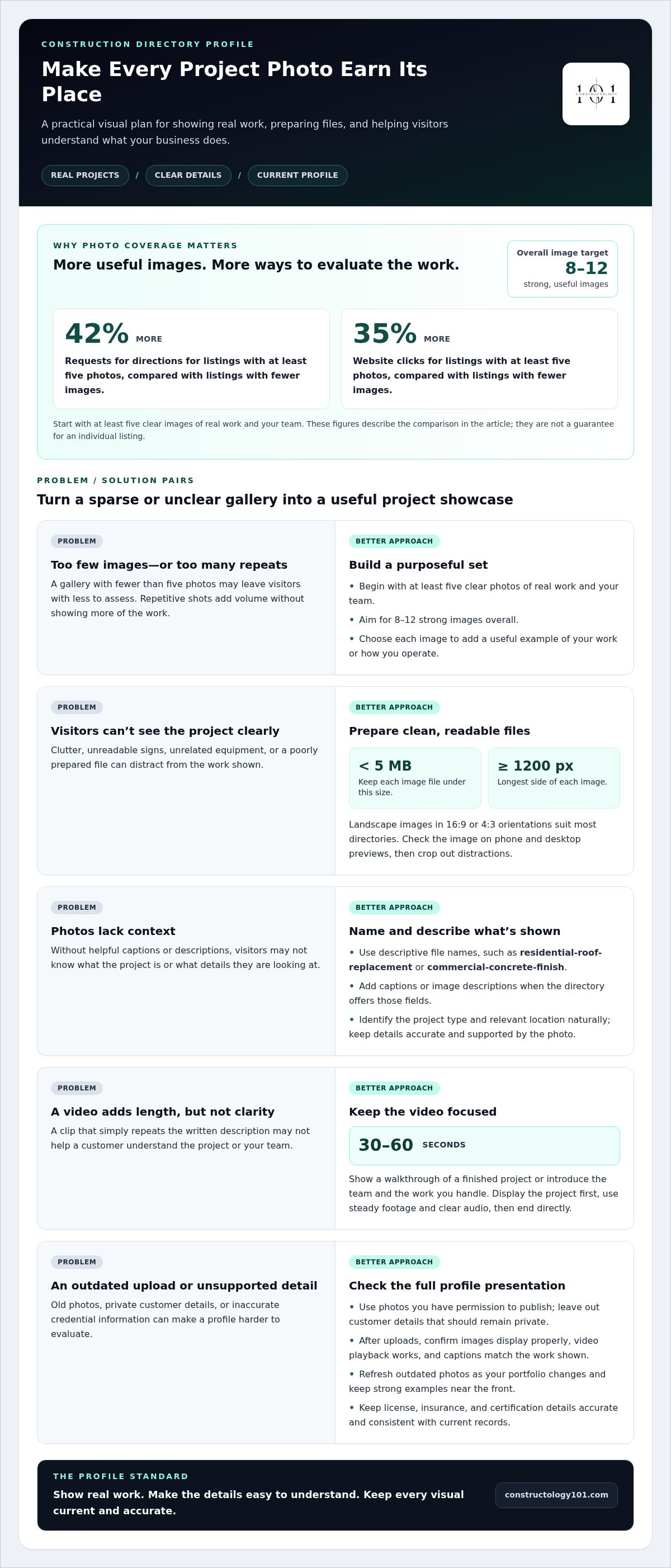
Choose photos that show completed construction work, your crew, and the details customers want to assess. Listings with at least five photos receive 42% more requests for directions and 35% more website clicks than listings with fewer images. Aim for 8–12 strong images, rather than filling your business profile with repetitive shots. Each photo should add a useful example of your work or how you operate.
Start with a finished project that represents a service you want customers to find. Add a progress photo if it helps explain the scope, then include a team image to put people behind the work. A remodeling contractor, for example, might show a completed kitchen, a cabinetry detail, and the crew on site. Use photos you have permission to publish, and leave out customer details that should remain private.
Prepare clear, high-quality files before uploading them. Keep each image under 5 MB and make the longest side at least 1200 pixels. Landscape images in 16:9 or 4:3 orientations suit most directories. Check each image on a phone and desktop preview; crop out clutter, unreadable signs, and unrelated equipment. These steps help ensure project details remain visible at common screen sizes.
Give images descriptive file names before uploading, such as “residential-roof-replacement” or “commercial-concrete-finish.” Add captions or image descriptions when the directory offers those fields. Identify the project type and relevant location naturally, without repeating keywords or adding claims the photo cannot support. Accurate details help visitors understand what they’re viewing and can strengthen the overall listing experience.
Consider a 30–60 second video for a directory profile. Show a brief walkthrough of a finished project, or introduce the team and explain the work you handle. Keep the opening focused: display the project first, then add concise narration or labels. Use steady footage, clear audio, and a direct ending. A video should help customers decide what action to take, not simply repeat the written description.
Make licensing, insurance, and certification details accurate and easy to understand. Display the license type and number, relevant insurance information, and exact certification names with their issuing organizations. Include validity details where the directory allows, and keep every statement consistent with current records. Don’t imply that a credential covers work or locations beyond its stated scope.
Review the profile preview after every upload. Confirm images display properly, video playback works, and captions match the work shown. Refresh outdated project photos when your portfolio changes, while keeping the strongest examples near the front. An interactive construction directory listing gives professionals a place to present their work and profile details together.
3. Where do I put these keywords in my directory?
Use relevant terms in your directory description, service fields, and business categories. Optimizing a construction directory profile starts with identifying the services customers need, then explaining why your business fits. For example, describe a specialty in historic home restoration or commercial concrete work. Keep every phrase accurate, readable, and focused on work you actually perform.
Listing costs vary by directory, listing type, and optional placement features. For a specific listing, the price depends on the case and is provided after a quote request. Compare what each listing includes, such as profile fields and ways to present your services, before deciding whether it fits your business goals.
A useful profile includes your business name, phone number, website, hours, service areas, primary services, and relevant credentials. Add a concise description of your strengths, such as experience with occupied commercial buildings or custom residential projects. Keep contact and service details consistent with your website so customers see the same information across platforms.
For local search, choose the most accurate primary category, then add secondary categories only for services you genuinely offer. Describe the areas your team serves in the directory and on your website. Use location terms naturally in the description and supporting website content. If you serve distinct areas, separate pages can explain the services available in each one.
Build a keyword list around actual customer language. Brainstorm 10–15 secondary keywords covering specialties, project types, and service areas, then prioritize the phrases that best match your work. Use the strongest terms in relevant profile fields and descriptions. Some directories limit descriptions to 150 characters, so prepare a short version that preserves the service and value proposition.
Natural wording matters. Instead of repeating a service phrase, explain your specialty and give a clear example of the work involved. Your description might say that your company handles commercial tenant improvements, then specify interior fit-outs or accessibility upgrades if those reflect your services. This makes optimizing a construction directory profile clearer for searchers and directory visitors.
Measure calls, website visits, and leads by noting which directory generated each enquiry. Use distinct tracking links for listings where possible, review referral traffic in your analytics platform, and record how callers found you. Compare enquiry relevance, not just volume. These steps make optimizing a construction directory profile an ongoing process guided by customer actions and useful results.
4. Benefits of local SEO and online directory citations
Local SEO helps contractors appear in Google search results and Maps when nearby customers search for specific services. BrightLocal’s recent consumer survey found that over 90% of consumers used the internet to find a local business. Accurate service details and citations help business owners make their companies easier to discover.
A local citation is a business mention that includes identifying details, often its name, address, and phone number. Keep those details consistent across your website, Google Business Profile, construction directories, and social media pages. Use the same business name and phone format everywhere instead of alternate names or outdated contact numbers.
Consistency helps customers recognize your business across search results. It also reduces confusion when someone moves from a directory listing to your website or calls. Audit each profile for duplicate listings, old phone numbers, and incorrect addresses. Correct the main business record, then bring relevant listings into line with it.
Google Maps visibility depends on more than citations. Your profile should accurately describe your services and service areas, while your website supports those details with relevant local content. Keep coverage realistic and consistent. Describe the areas your team can serve rather than implying that you cover locations beyond your operating reach.
For contractors in the United States, start with Google Business Profile, then prioritize construction or trade-specific directories and reputable local business directories relevant to your services. Choose listings that customers in your market use, and skip unrelated sites added solely to increase your listing count. The best choices fit your trade, audience, and business goals.
More listings can widen discovery, but quality and accuracy matter more than sheer volume. Businesses can claim and distribute anywhere from 50 to 75 online directory listings, depending on locale or region. Build a manageable group of relevant profiles, then maintain them. Inaccurate listings can weaken trust even when a contractor appears across multiple sites.
Citations also contribute to local authority. Moz.com experts suggest citation signals account for roughly a tenth of local SEO ranking factors. That makes citations one part of a broader effort, alongside useful website information, an accurate service footprint, and a complete profile. No single directory entry replaces those supporting signals.
Track visibility and customer actions by source. Record calls, website visits, and enquiries associated with each directory, then compare profile quality with actual results. Review the data during quarterly audits. Keep listings that connect with relevant customers accurate, and refine profiles that generate little engagement or describe your services poorly.
5. Claiming and updating directory listings
Start with listings that already mention your construction business. Search your exact business name and phone number, then record each directory, profile owner, and status in a tracking sheet. Claim profiles you control and correct outdated entries. Complete directory profiles receive 2.7 times more views than incomplete profiles, so fill relevant fields rather than leaving gaps.
Claiming usually involves submitting business details and completing the directory’s verification process. For listings that use postcard verification, the process usually takes 5-10 business days. Monitor the business address during that window, follow the directory’s instructions, and enter the verification code promptly. Keep a record of login access so future updates don’t depend on one employee.
Set one source of truth for core business information. Record the official business name, phone number, website, hours, and service areas in a shared document. Keep the hours and contact information on your Google Business Profile matched to your website. Apply the same details to relevant directory listings and social media profiles.
Update the record whenever the business changes. If your phone number changes, revise the website and directory profiles together. Describe service areas consistently across profiles and your website. Businesses that don’t receive clients at their facility can hide the physical address on a service-area profile. Keep weekly hours and holiday closures clear across listings.
Schedule a quarterly audit to catch details that drift. A routine directory audit takes about 30 minutes per directory. Review the business name, address, phone, hours, service areas, website link, categories, and profile status. Check for duplicate listings and outdated descriptions, then note the correction and completion date in your tracker.
Prepare description versions of 50, 100, 250, and 500 words to fit different directory limits. Keep the core facts consistent while adjusting length and emphasis. After an update, view the live listing and compare it with your source document. Confirm that links work, hours display correctly, and the profile still reflects relevant services.
Use a simple maintenance workflow: assign an owner, record changes, update profiles, and review the results. This makes accuracy part of routine operations, rather than a scramble after a customer reports an error. A complete, current profile serves customers better than a forgotten or partial listing.
Ready to put your updated profile into practice? Build your construction directory presence with a profile designed for industry connections.
Constructology 101: Interactive Directory Listing
Constructology 101 offers an Interactive Directory Listing for construction professionals who want an industry-focused place to present their business. Use it to make your profile part of a professional network where architects, engineers, trades, and suppliers can discover one another, share project information, and communicate through integrated messaging.
It’s a natural next step after refining your photos, profile details, and local listings. If you want to build industry connections alongside your directory presence, explore the Interactive Directory Listing. Pioneer membership is also available at a lifetime price.
Visit Constructology 101 online to explore the directory and find the option that fits your goals.
Turn profile maintenance into a steady growth habit
Make your next move a deliberate one. Treat optimizing a construction directory profile as an ongoing business habit, tied to changes in your projects, team, and professional goals. A profile should keep pace with the company it represents. Assign someone to own future updates, and use customer questions to spot details that deserve clearer explanations. This keeps your online presence useful as your business evolves, rather than letting it become a snapshot of an earlier stage.
For construction professionals looking to build industry connections alongside directory visibility, Constructology 101 offers an Interactive Directory Listing. The platform brings construction professionals together to find services, share project information, and communicate. Pioneer membership is available at a lifetime price, offering another way to participate in the network.
Choose the next step that fits your goals. Explore Constructology 101 and build a stronger foundation for your professional presence.
Frequently Asked Questions
What images should you include?
Choose photos that help prospective customers judge the kind of work you handle. Show completed projects, distinctive finishes, and your crew performing relevant tasks. A deck builder, for example, could feature the finished deck, close-ups of the railings, and a crew member installing boards. Select images that tell different parts of the story rather than several nearly identical views. Add brief captions that identify the project type without revealing private customer information.
When should you ask for reviews?
Ask for a review after the customer has experienced the completed work and had a chance to share feedback. A natural moment might be after a final walkthrough or a follow-up confirming their questions were addressed. Keep the request brief and neutral, and let the customer decide what to write. Avoid offering rewards or asking for specific phrases. An honest account is more useful than a scripted endorsement.
Where do I put these keywords in my directory?
Use relevant phrases in the directory’s business description, service fields, and category selections. Match each term to a real offering, such as “historic home restoration” for a contractor with that specialty. Keep the wording readable and specific. Read the profile aloud: if a phrase sounds forced or doesn’t explain your work, revise it. Tailor each directory description to its fields and audience.
How should contractors choose profile categories and service areas?
Select the category that best describes your main line of work, then add secondary categories only for services you genuinely provide. Define service areas around places your team can realistically serve, not every location that might generate an enquiry. If separate branches or hubs handle distinct territories, describe each area accurately. Don’t assign a remote office the same coverage as a hub that serves those customers directly.
What photos, project details, and credentials improve a construction directory profile?
Pair project photos with concise context, such as the type of work, its scope, and your company’s role. A commercial renovation entry could explain whether your team handled the interior fit-out or another defined task. Display credentials using their accurate names and issuing organizations, and keep project claims factual. This helps visitors understand your experience without mistaking another contractor’s work for your own.
How do directory listings affect local search rankings and lead generation?
Listings give potential customers another way to find your business and assess whether your work fits their needs. A relevant profile can support discovery, while clear contact details make it easier to take the next step. Measure lead quality as well as enquiry volume: note whether callers ask about services you provide, suitable project types, and areas you serve. This helps you judge whether a listing attracts relevant prospects.
How should a contractor manage reviews and respond to negative feedback on directories?
Read the full comment before replying, then address the concern without becoming defensive. Acknowledge the customer’s stated experience, clarify a factual point only when needed, and offer to continue the discussion privately. If feedback mentions a missed update, for example, recognize the communication issue rather than arguing about the project publicly. Keep personal or contract details out of your response, and use recurring feedback to improve your customer process.


