

A construction vendor directory can do more than surface names: it can help you find relevant expertise and start a professional conversation. Searching across multiple specialties takes time, and a basic list may offer little beyond contact details. A directory is more useful when searchable profiles make it easier to understand what a business does and connect with industry peers.
Construction professionals, from architects and engineers to specialty trades and suppliers, use directories to find peers and present their own skills and services. But not every directory works the same way. Some offer simple listings; interactive platforms can also support project sharing and messaging, giving members more ways to connect.
This article explains who uses construction vendor directories, what makes an interactive directory different, and how to use one to discover professionals or make your business easier to find. You’ll also learn where a directory fits in a project search: it can help you identify and reach industry peers, while project decisions still depend on your own judgment. Use these steps to turn a search into a more focused professional connection.
Key Takeaways
- A construction vendor directory helps you discover industry businesses and professionals, but it isn’t a project-management tool or contracting service.
- Turn a broad search into a focused one by defining the need, identifying the relevant role, narrowing by trade or service, and following up.
- Compare basic listings, association directories, and interactive networks to find the discovery and communication features that fit your goal.
- Use separate steps to guide your search as a project buyer or to present your business as a vendor.
- Constructology 101 brings construction professionals together to showcase skills, share project information, and communicate.
What Is a Construction Vendor Directory, and Who Uses One?
A construction vendor directory organizes businesses and professionals who contribute to building projects. Entries are typically grouped by trade, service, or professional role, helping users look beyond their existing contact lists. In short, a construction vendor directory helps construction professionals find and present industry expertise through a searchable collection of businesses and services.
A directory supports discovery, not project execution. It isn’t a project-management tool for tracking tasks, a procurement system for handling purchases, or a contracting service that performs construction work. It can help you identify potential connections, but it doesn’t make project decisions or guarantee that a listed business is the right fit. That distinction matters: construction work involves coordinated roles, as an overview of Construction Management helps illustrate, while a directory is one starting point for finding professionals involved in that work.
Which construction professionals belong in a vendor directory?
A useful directory reflects the range of roles found across a project, not just contractors seeking bids. General contractors may look for specialty firms or suppliers connected to a particular scope. Specialty contractors and trades can use listings to present their services and skills to peers who may need their expertise. Their work may cover a defined trade or service rather than an entire project.
Suppliers form a distinct audience, with offerings that support the materials and products a project requires. Architects and engineers bring another perspective: they may use a directory to discover businesses and professional peers whose expertise relates to planning, design, or technical work. Categories that distinguish these roles make it easier to understand who does what and where a business may fit. A broad label like “construction” doesn’t tell users whether an entry represents a supplier, design professional, or trade contractor.
What problems can a construction vendor directory help solve?
Searching for contacts can become fragmented. A professional might keep one set of contacts from past projects, find others through colleagues, and search separately for an unfamiliar trade or supplier. An organized directory provides a shared discovery point, so users can begin with a relevant category instead of piecing together scattered names or unrelated business listings.
Categories also help narrow the search. If a project requires a specific trade, focus on businesses listed for that work rather than scanning every construction-related entry. If the need is broader, such as finding a design professional or supplier, role-based categories offer a clearer starting point. This structure can make discovery more focused, especially when you’re looking beyond your usual network.
A listing is still a starting point, not a recommendation or a record of project performance. Use it to identify relevant businesses and understand the services they describe. Then apply your own project judgment to decide which conversations and next steps make sense.
How Construction Vendor Directories Turn Search Into Discovery
A useful directory search starts before you type a trade name. First, pin down the project need: what work, material, or professional input is required, and what part of the project does it support? Then move from the broad requirement to the role most likely to address it. This keeps the search tied to the work rather than just familiar company names.
Searchable trade and service categories make vendor discovery more focused by organizing businesses around the work they do. That structure helps buyers move from a broad construction search to a smaller set of relevant entries. It also helps professionals describe their expertise in terms peers can recognize. Construction involves a range of occupations and business roles; the U.S. Bureau of Labor Statistics on Construction offers wider context on the sector.
How do buyers narrow a directory search?
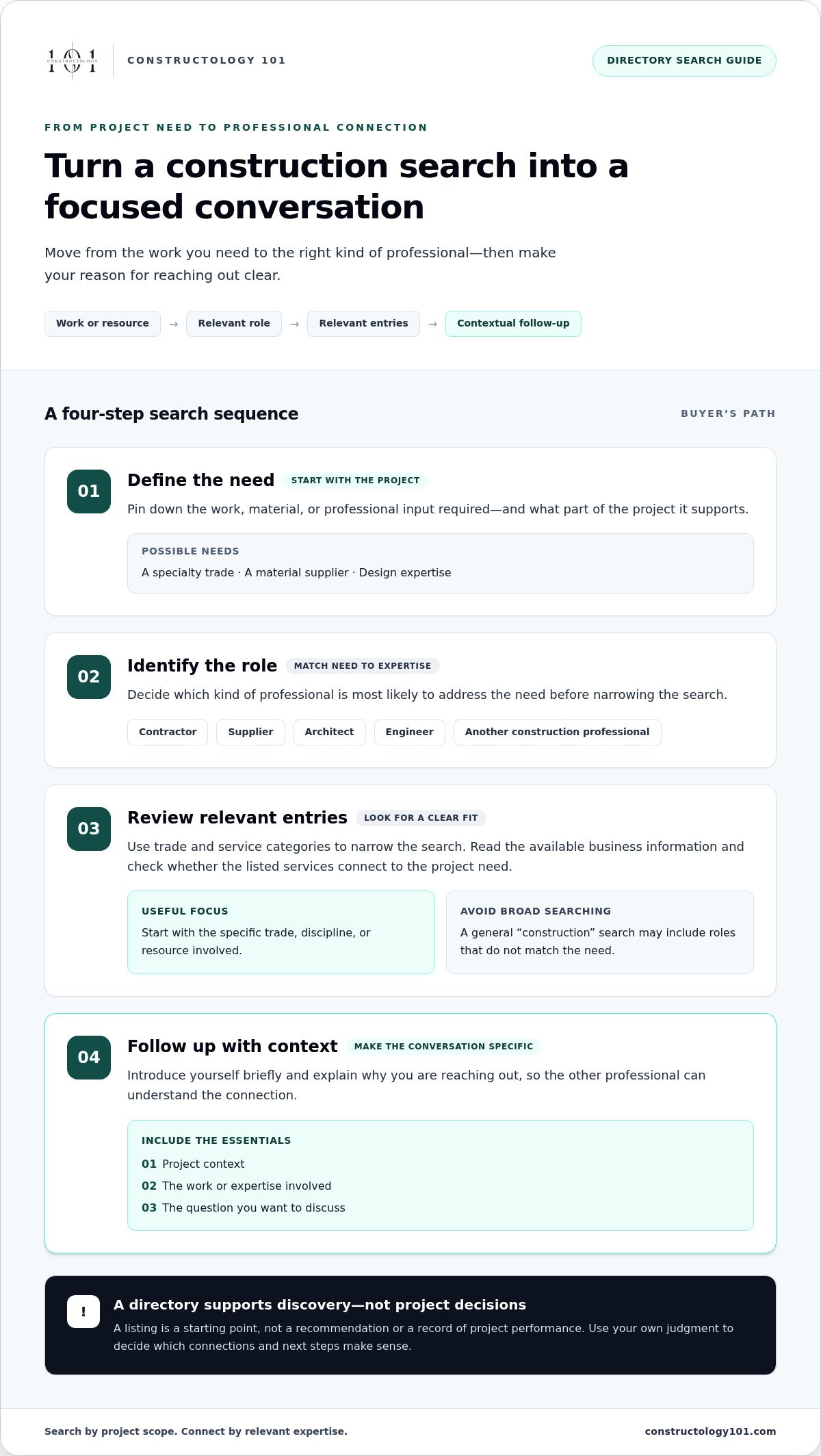
Use this sequence to turn a project question into a manageable search:
- Define the need. Describe the work or resource required, such as a specialty trade, a material supplier, or design expertise.
- Identify the role. Decide whether the need points to a contractor, supplier, architect, engineer, or another construction professional.
- Review relevant entries. Read the available business information and look for a clear connection between the listed services and the project need.
- Follow up with context. Contact a promising professional with a brief, specific introduction that explains why you’re reaching out.
Keep search terms grounded in the project scope. If the project needs a particular trade, start there rather than searching broadly for “construction.” If the need is still taking shape, identify the discipline or resource involved first. The goal isn’t to collect the longest list. It’s to find entries worth a closer look.
What should happen after a vendor is discovered?
A listing helps you identify a possible connection. A useful conversation begins when you explain why you’re reaching out. Include the project context, the kind of work or expertise involved, and the question you want to discuss. Vendors can make an introduction clearer by describing their services directly and sharing relevant project information where the directory supports it.
Keep the first exchange focused. A clear message gives both professionals a reason to continue the conversation, without treating directory visibility as proof of qualifications or project suitability. Those decisions require project-specific judgment and a closer understanding of the work. Discovery opens the door; the conversation helps clarify whether there’s a practical next step.
Constructology 101’s interactive construction directory brings searchable profiles together with project sharing and messaging. Construction peers can introduce their work and connect around shared industry interests.
Construction Vendor Directory Types: Listings, Member Directories, and Networks
Not every construction vendor directory offers the same experience. One may help you look up a company; another may connect members through profiles, project sharing, or messaging. Choose based on the task you need to complete, not just the size of the directory. A long list can offer broad coverage, while a focused network may make relevant professional connections easier to explore.
| Directory type | Purpose | Typical audience | Discovery and communication |
|---|---|---|---|
| Basic business listings | Make company names, services, and contact information easier to find | Buyers and businesses looking for visibility | Search or browse entries; communication generally happens outside the listing |
| Association directories | Help people find organizations or professionals connected to a membership group | Association members and people seeking businesses in that community | Browse member categories; interaction depends on the directory’s features |
| Interactive professional networks | Support discovery alongside professional interaction | Construction professionals across trades, design, and supply roles | Explore profiles and, where supported, share project information or message members |
How does a basic vendor listing differ from an interactive directory?
A basic listing is primarily a reference point. It presents organized business information and service visibility, then leaves the next conversation to the people involved. An interactive directory can extend beyond that entry when it includes tools such as messaging or project sharing. Those features give professionals more context for connecting, but they don’t guarantee work, establish project fit, or replace due diligence.
Association directories have a different purpose: they organize businesses around a shared membership community. That can make them useful when you want to discover organizations within that group. Their audience and reach may differ from those of a construction-focused professional network that brings several industry roles together.
When is a construction-specific professional network useful?
A shared construction network can help when your discovery needs cross role boundaries. A specialty trade may want to present its services to peers; an architect may be looking for relevant industry connections; a supplier may want to make its business visible alongside other construction professionals. Clear construction categories give each audience a more relevant starting point than an undifferentiated business list.
Interaction matters, too. If a directory supports project sharing and messaging, members can offer more context than a name and service label alone. That creates a path from discovery to conversation, while leaving decisions about qualifications and project fit with the professionals involved. Directories also don’t replace industry-specific obligations; the U.S. Department of Labor’s construction resources provide information on labor compliance, a separate consideration from directory visibility.
For a closer look at how interactive listings support construction networking, read this interactive directory listing guide. It outlines the differences between a searchable reference, a member roster, and a platform where professional discovery can continue through sharing and messaging.
How to Use a Construction Vendor Directory for a Real Project Need
A directory search works best when it starts with a clear project requirement, not a vague request to “find a contractor.” Define the work, material, or expertise you need, then use relevant categories to identify businesses for further discussion. A construction vendor directory can organize discovery, but the project team remains responsible for deciding which connections merit a closer look.
A practical directory workflow for project teams
Turn the requirement into a focused search, then move from entries to conversations:
- Describe the need. Write down the scope, the service or supplier category involved, and what you want to discuss. A specific description helps keep the search relevant.
- Review related entries. Look for businesses whose stated services connect to the project need. Note the details that prompted your interest, such as a particular trade or shared project context.
- Shortlist for conversation. Select potential contacts for follow-up rather than treating every result as a match. A directory entry is a starting point, not a decision about qualifications or project fit.
- Introduce the project clearly. Explain who you are, what the project requires, and the next step you have in mind, such as an initial conversation about the scope.
Keep the first message concise. For example: “Hello, I’m reaching out about a project involving [brief scope]. Your listed [service or specialty] looks relevant. Would you be open to a conversation about the work?” This gives the recipient enough context to understand why you contacted them without burying the request in a long project brief.
A practical directory workflow for vendors
For vendors, the goal is to make the business easy for industry peers to understand. Describe your construction role and services in clear, specific language. Explain the kind of work your business handles, and use relevant project information to show how those services apply in practice. Keep descriptions accurate and focused; a useful profile helps peers recognize potential relevance without implying a guaranteed project fit.
Project information can add context to a service description. Share examples that help explain your experience or capabilities, while keeping the focus on what you contributed. When a potential connection reaches out, respond to the need they’ve described and clarify what kind of conversation would be useful next. That turns visibility into a professional exchange without assuming it will lead to a contract or project award.
When comparing directory approaches, consider how easily suppliers can present their offerings and how clearly buyers can search for the products or services they need.
Constructology 101’s interactive directory lets construction professionals showcase skills and services, share project information, and communicate through messaging.
How Constructology 101 Connects Construction Vendors and Professionals
Constructology 101 brings construction discovery and professional interaction together in an interactive directory and social network built for the industry. Rather than stopping at a business name and service description, the platform gives members ways to showcase what they do, share project information, and communicate through integrated messaging. It supports connections across construction roles while leaving project decisions to the people involved.
How the platform supports construction-industry connections
The directory is designed for architects, engineers, specialty trades, and suppliers. Each role contributes a different kind of expertise, so a shared industry space can help professionals discover peers beyond their usual circle. A specialty trade can present its services; a supplier can make its business visible; and design professionals can share information about their work and connect with industry peers.
Project sharing adds context to a profile. It can help members show the kind of work they do and give others a clearer starting point for a conversation. Integrated messaging gives professionals a direct way to communicate through the platform. Together, these functions create a path from visibility to interaction: present your work, explore other professionals’ information, and start a relevant exchange.
That interaction is useful, but it isn’t a promise of leads, contracts, or project awards. Treat the directory as a place to discover people and begin professional conversations, then use your own judgment to assess whether a connection suits a particular project. To evaluate whether a directory supports ongoing connections, look beyond searchable entries: consider whether professionals can share useful context and continue the conversation through available communication tools.
What the Pioneer Membership is designed to provide
The Pioneer Membership is an early-adopter lifetime membership that provides access to Constructology 101’s networking, project-sharing, and messaging tools at a one-time price. Its value is centered on access to those platform features, not a guaranteed business result. Members can use them to present their work, engage with industry peers, and share project information as part of their professional presence.
Before choosing a directory, consider what you want it to support: a basic search, a visible professional profile, or ongoing interaction with construction peers. The Pioneer Membership is designed for professionals who want networking and communication features alongside directory participation. When assessing a lifetime membership, consider whether the included tools align with how you want to build your professional presence and connect with peers.
Professionals can join Constructology 101 to participate in an industry network built around professional discovery and connection.
Make Your Next Industry Connection Count
Start by deciding what you want a construction vendor directory to make easier: helping peers understand your business, meeting professionals outside your usual circle, or continuing industry conversations. A clear goal gives your participation direction and helps you focus on connections that matter to your work.
Then present your work with purpose. Describe your professional identity clearly, share information that reflects what you do, and approach conversations with a specific reason to connect. Strong industry relationships begin with relevance and grow through thoughtful interaction. You don’t need to wait for a project need to start building your professional presence.
Constructology 101 offers construction professionals a place to take that next step. Its Pioneer Membership provides lifetime platform access at a one-time price, without promising a particular business outcome. Join Constructology 101 and build connections across the construction industry. Make your expertise easier to discover and start meaningful conversations.
Frequently Asked Questions
Is a construction vendor directory only for general contractors?
No. General contractors may use one, but a construction vendor directory can also serve specialty trades, suppliers, architects, engineers, and other construction professionals. For example, an engineer looking for a supplier or a trade business seeking to connect with peers can use a directory too. The useful question is whether its categories and listings reflect the kinds of professionals you want to find or reach.
Can small construction businesses benefit from a vendor directory?
Yes. A directory can give a small business another way to present its work to industry peers, especially when it specializes in a trade or service that’s easy to overlook in broad searches. Make the business description specific: identify the work you do, the role you fill, and the capabilities you want people to understand. Clear information helps readers assess relevance without assuming a listing will produce inquiries or work.
What should I include when contacting a vendor I found in a directory?
Include who you are, why you’re reaching out, the project context, and a clear next step. For instance, mention the type of work under consideration and ask whether the business is open to an initial discussion. Keep the message focused rather than sending a long project brief upfront. A specific introduction helps the recipient understand the connection and respond with relevant questions or information.
Does being listed in a construction vendor directory guarantee project leads?
No. A listing can make a business visible to people exploring construction professionals, but it can’t guarantee inquiries, leads, contracts, or project awards. Results depend on factors beyond a directory entry, including the project need and whether the business is a suitable fit. Treat a listing as a way to present your services and support discovery, then build professional connections through clear, relevant communication.
How often should a construction business review its directory information?
Review your listing whenever a meaningful business detail changes, such as the services you provide, your professional role, or the examples you use to describe your work. It’s also useful to revisit the profile during a regular business check-in, so older wording doesn’t misrepresent your current capabilities. Ask a colleague to read it: can they quickly tell what your business does and who it serves?
Can a construction vendor directory replace referrals and existing business relationships?
No. A directory is best used alongside referrals and established relationships, not as a substitute for them. A referral may introduce you to a professional through an existing connection, while a directory can help you explore businesses and peers beyond your current contacts. Use each route to broaden discovery, then consider the project context and your own judgment before deciding which conversations to pursue.


