

Bid coverage grows when your search reaches beyond firms already in your contacts. A construction subcontractor directory helps you find trades and suppliers by location or NAICS code, broadening the pool of potential bidders for a project.
That wider reach matters when your network lacks a needed trade, a project area, or a specific scope of work. A directory makes it easier to narrow a broad search and identify businesses that may fit the bid.
Learn how to use location and NAICS filters, what information to compare, and how directories can support subcontracting opportunities. You’ll also see how an interactive construction industry directory can help you build connections and make your business easier to discover.
Key Takeaways
- Expand bid coverage by building a broader pool of trade and supplier contacts, then organize your listing so potential partners can understand your capabilities.
- Narrow searches by state, city, and project location to focus outreach on businesses positioned to work in the area.
- Use NAICS codes to find companies by industry category, and compare the code with the actual scope of work you need covered.
- Search directories for both subcontractors and suppliers, then assess licensing and insurance separately using the requirements relevant to the work and location.
- Learn how an interactive industry listing can help construction professionals become discoverable and build business connections.
How does a subcontractor directory improve bid coverage?
A directory expands your search beyond contractors already in your contacts. Search by trade, location, or NAICS code to find vendors for uncovered scopes. Then compare each listing with the project’s work, schedule, and geography. A construction subcontractor directory supports discovery, but it doesn’t determine whether a company fits your bid.
For small businesses pursuing federal subcontracting work, the SBA recommends using its directory to find a prime contractor’s website and assess subcontracting requirements. Review the prime’s opportunities, then match your capabilities to its needs. This turns a general search into focused outreach and can reveal scopes your current network doesn’t cover.
A clear listing can make your company easier to find when contractors search for a specific trade or area. Describe the work you perform, relevant project experience, service locations, and contact details. Use specific capability language rather than broad claims. For example, a paving vendor should identify its paving services, not simply say “construction.” Keep details current so buyers can assess fit quickly.
Federal contract directories offer another route to potential relationships. The DOT subcontracting directory lists FY2026 firms under NAICS codes, including American Civil Constructors, Inc., AUI, Inc., Granite Construction Company, HK Contractors, Skanska USA Civil, and Wagman Industrial Services under 237310. Treat these as research leads, not proof of current availability or project fit. Compare each company’s stated work with the scope you need covered.
Downloadable vendor listings can help organize research outside the search page. The federal directory’s records include vendor name and location, contracting agency, PSC and NAICS codes, performance state, PIID, performance dates, and total contract value. Its data comes from FPDS-NG. The directory displays federal contracts by fiscal year, running October 1 through September 30, and removes information after five (5) years. Filter the file by trade, location, or agency before building an outreach list.
Free versus paid directories: Compare what each listing lets you search, display, and update. A free option may suit basic discovery; assess a paid option by its visibility tools and access features. Choose based on the information and functions your bid process needs, not the label alone.
Verify credentials and assess risk: Compare a subcontractor’s license details, insurance documents, references, and safety records with the trade and project requirements. Check that business names, work scopes, and dates align. Directory listings can be outdated or incomplete, so treat a match as a starting point. Risks include an unsuitable scope, stale contact details, and assumptions about capacity. Document your review before inviting a firm to bid.
Finding construction subcontractors by state and city
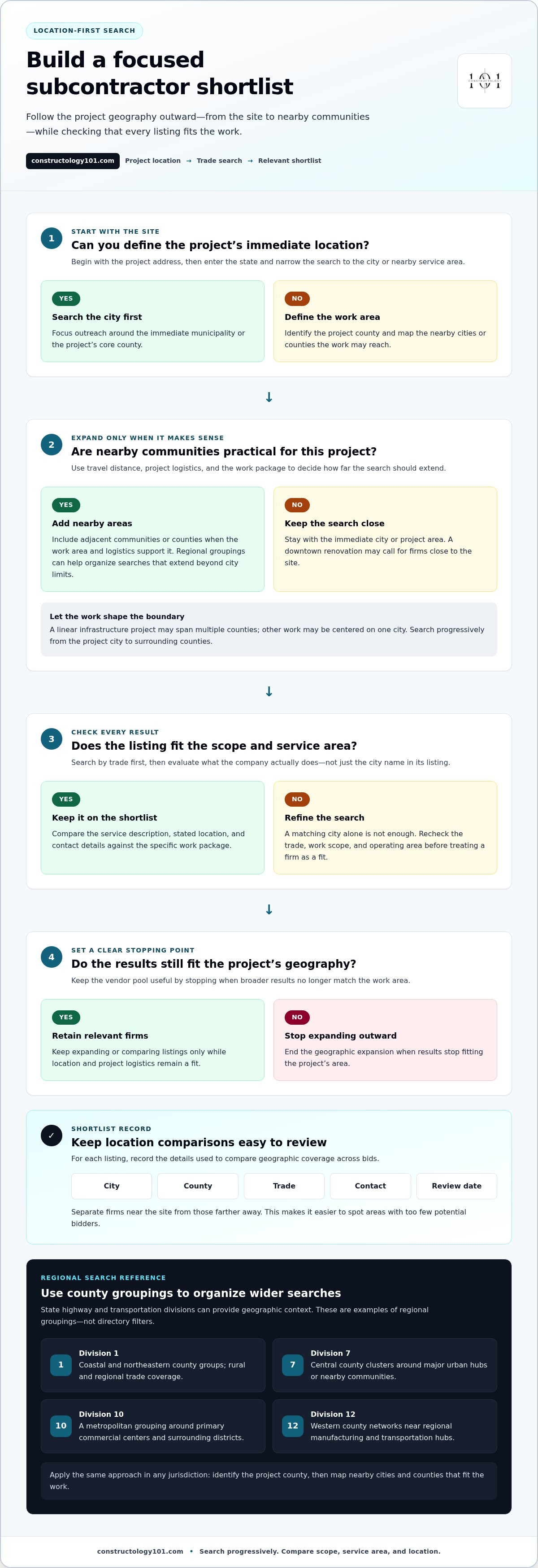
Start with the project address, not a broad state search. Enter the state, then narrow results to the city or nearby service area. For example, a search for metropolitan subcontractors can focus outreach around the immediate municipality. Add adjacent communities only when travel distance and project logistics make them practical.
Use location filters to build a short, relevant list. Search by trade first, then compare locations, service descriptions, and contact details. For example, a contractor seeking paving coverage near a major metro area can search the core county and nearby districts. Review each listing for the specific scope, not just a matching city name.
County boundaries can help organize regional searches. State highway and transportation divisions offer a useful geographic reference. Regional divisions often cover multiple counties, grouping them together for infrastructure and administrative purposes. A project site may prompt searches across this nearby regional group, especially when the work area extends beyond city limits.
- Division 1: Focus on coastal and northeastern county groups to capture rural and regional trade coverage.
- Division 7: Use central county clusters to structure searches around major urban hubs or nearby communities.
- Division 10: This metropolitan grouping can guide searches around primary commercial centers and surrounding districts.
- Division 12: Include western county networks when a project reaches regional manufacturing and transportation hubs.
These divisions are geographic examples, not directory filters. Apply the same approach in any jurisdiction: identify the project county, then map nearby cities and counties that fit the work. A trade serving one city may also cover surrounding communities, while another listing may be limited to a smaller operating area. Use Constructology 101 tools, the company’s stated location, and service descriptions to refine your results.
Keep a location-based shortlist for each bid. Record the city, county, trade, contact, and date you reviewed each listing. Separate firms near the site from those farther away. This simple structure helps you compare geographic coverage across bids and quickly spot areas with too few potential bidders.
Before outreach, match the search area to the work package. A downtown renovation may need firms close to the site; a linear infrastructure project may span multiple counties. Search progressively, from the project city to surrounding counties, and stop when results no longer fit the project’s geography. This keeps the vendor pool focused and useful.
Search by NAICS code
NAICS codes give directory searches a consistent industry category. Use one when trade names vary across company listings. A search can reveal firms that describe similar work differently. Start with the code tied to the project scope, then compare each result’s services and experience with the actual work package.
The DOT subcontracting directory lists several firms under NAICS code 237310 for FY2026. These include American Civil Constructors, Inc., AUI, Inc., Granite Construction Company, HK Contractors, Skanska USA Civil, and Wagman Industrial Services. Their shared code gives you a focused starting set. It doesn’t mean each firm performs the same work or fits every bid.
Use the code as a filter, then narrow results by project location and scope. For example, a contractor seeking firms under 237310 can review the listed companies, then compare their locations and relevant capabilities. Keep the bid package’s requirements beside the search results. That makes mismatches easier to spot before outreach.
- 237310: The DOT directory lists American Civil Constructors, Inc., AUI, Inc., Granite Construction Company, HK Contractors, Skanska USA Civil, and Wagman Industrial Services for FY2026.
- 236220: The directory lists Ace Engineering, Inc.S for FY2026.
- 541330: The directory lists Ayres Associates, Inc. for engineering services in FY2026.
Codes can also help identify adjacent services. The 541330 entry explicitly relates to engineering services, while 237310 and 236220 can help focus separate searches. Treat each result as a lead to evaluate against your scope. Don’t assume a code alone proves that a company offers a particular specialty or is seeking work.
Build a repeatable search process for each bid. First, identify the project’s main work category. Next, search that NAICS code in the directory. Then add location filters and review company descriptions. Save relevant firms along with the code, location, and scope that prompted your selection. This record helps your team compare results across bid packages.
A code-based search is especially useful when a project needs coverage beyond familiar contacts. Search a category first, then expand by geography or related work packages. For a mixed-scope project, run separate searches for each distinct trade rather than relying on one broad category. This makes gaps visible and creates a more useful outreach list.
Finally, confirm that each listing’s described work aligns with the specific bid. A code helps organize discovery, but the scope, location, and project requirements determine relevance. Use those details to prioritize outreach and improve coverage without treating a directory entry as a qualification decision.
Searchable subcontractor and supplier directory
A searchable directory helps contractors find firms beyond their existing contacts. Search by trade, supplier category, or project location. For example, a builder needing electrical work can look for electrical subcontractors, then search separately for material vendors. This separates installation coverage from product sourcing and makes gaps easier to spot before bid outreach begins.
Use more than one search term for each work package. A directory might categorize a firm by its primary trade, while its profile describes additional capabilities. Search “concrete” and “foundations,” for example, then compare matching listings. Review service descriptions and locations before adding a company to your shortlist. This helps you find firms that describe similar work differently.
Search for suppliers as well as subcontractors. A project may need both a trade contractor and a source for specialized materials. For a roofing package, look for roofers and roofing suppliers. Keep these results in separate groups so you can compare installation coverage and material options without treating vendors as substitutes for subcontractors.
Build a consistent search routine for each bid package:
- Break the project scope into distinct trades and material needs.
- Search each trade and supplier category separately.
- Add the project location to narrow the results.
- Compare profile descriptions with the work package.
- Save relevant firms in a shortlist for outreach.
For federal subcontracting opportunities, the SBA recommends that small businesses use the directory to find a prime contractor’s website and assess its subcontractor requirements. Start with the prime, review its stated needs, then search for subcontractors and vendors suited to those scopes. This connects directory discovery to a defined opportunity instead of a broad, untargeted search.
Search results are a starting point, not a bid decision. Compare each listing’s described work with the project documents. A supplier listing may support a material need, while a subcontractor listing may match a labor scope. Record why each company fits, such as “steel supplier for structural package” or “electrical contractor for tenant fit-out.” Clear notes help teams review candidates consistently.
Keep your shortlist useful as the bid develops. Remove listings that don’t match the scope, location, or project requirements. Add a separate note for unanswered questions and outreach status. For example, label a firm “potential flooring subcontractor” until its profile and response align with the package. This keeps search results organized without treating directory entries as verified qualifications.
A focused search can also expose missing coverage. If a package has several trade needs but search results address only some, search the uncovered scopes again using alternate terms. A construction directory works best as a discovery tool: search, compare, organize, then pursue the firms that fit the bid.
How to find licensed and insured construction subcontractors
A directory helps you identify potential firms, but a listing alone doesn’t establish credentials. For each candidate, compare the trade, project location, and stated qualifications. Then request documentation relevant to the specific work. For example, a roofing subcontractor needs a review suited to roofing work, not just a general profile check.
Start with the project requirements and the subcontractor’s scope. Identify which license details, insurance documents, references, and safety records matter for that work. Requirements can vary by trade and location, so assess each candidate against the project’s actual criteria. Apply the same criteria to every firm bidding on the package.
Use a clear review sequence for each directory result. Match the business name across its listing and documents. Compare the listed trade with the proposed scope. Review document dates and coverage details. Record what you reviewed and any follow-up needed. This creates a consistent comparison rather than relying on profile wording alone.
- License: Match the business name and trade to the project scope and location.
- Insurance: Review the submitted documents against the project’s coverage requirements.
- References: Request examples of comparable work, such as a similar renovation or paving package.
- Safety records: Review relevant records and procedures for the work being considered.
- Scope fit: Compare documented capabilities with the bid package before shortlisting.
For example, a directory result may describe a firm as a general contractor, while your package needs electrical subcontracting. Don’t treat the broad label as evidence of trade fit. Compare the company’s stated capabilities and supporting documents with the electrical scope. Record why you keep or remove that firm from consideration.
References add context a profile can’t provide. Ask for projects that resemble your planned work, then compare the described scope, location, and role. A reference for material supply may not demonstrate subcontracting experience. Use the same questions for each candidate and note the answers beside the listing.
Keep credential reviews tied to the bid record. Save the company name, trade, location, documents reviewed, and decision rationale. If a listing changes, this record helps explain which details supported the original shortlist. An organized review also helps your team compare firms against the same project criteria.
Build a more discoverable professional profile with an interactive construction directory listing, and make your trade and capabilities easier to find.
A subcontractor directory can help contractors find additional subcontractors and vendors by trade and location when their existing contacts are insufficient. Use that broader search to identify candidates beyond familiar referrals, while applying the same project-specific checks to every result. Focus on the trade and location relevant to the package, then confirm that each candidate’s documented capabilities align with its scope before moving forward.
Treat a new name as a lead, not a credential. Request the license, insurance, references, and safety information relevant to the work, and record any gaps or follow-up. If a candidate doesn’t demonstrate the needed trade fit, base your decision on the submitted evidence rather than directory wording. A wider search can support a disciplined shortlist while keeping standards consistent for every firm.
Constructology 101: Interactive Directory Listing
Constructology 101 offers an Interactive Directory Listing for construction professionals who want to be discovered and build industry connections. Use a listing to present your business within a construction-focused network that includes trades, suppliers, architects, and engineers.
Use the directory when you want to expand beyond existing contacts and make your business easier for industry peers to find. The platform also supports professional relationships through project information sharing and integrated messaging. Pioneer membership is available at a lifetime price.
Visit constructology101.com to explore Constructology 101 and its directory.
Build your next connection into your network
A bid search can do more than fill an immediate trade gap. Use each project to strengthen your professional network: keep your capabilities clear, share relevant project information, and stay connected with people whose work complements yours. A construction subcontractor directory can support that ongoing effort by making your business easier to discover.
Constructology 101 offers an Interactive Directory Listing for construction professionals, along with Pioneer membership at a lifetime price. Its professional social network supports business relationships, project information sharing, and communication through integrated messaging. These tools can help you turn directory discovery into meaningful industry connections.
Choose a practical next step for your business and explore how a listing fits your networking goals. Contact Constructology 101 to learn more and keep building your place in the construction community.
Frequently Asked Questions
What is a construction subcontractor directory?
A construction subcontractor directory is a searchable resource for finding construction businesses by service, specialty, or location. Contractors can use one to match project scopes with potential firms, while subcontractors and suppliers can present their capabilities to industry peers. Treat directory results as a starting point for outreach. A listing helps identify candidates, but the project’s scope and your qualification process determine whether a firm fits.
Can I search for construction subcontractors by state and city?
Yes. Use state and city fields to focus results on the project’s operating area. For a project near a state boundary, compare nearby locations too, since a company’s listed address may differ from its service territory. Keep the search tied to the work’s location and access needs. A shortlist that records each firm’s location and relevant work area makes it easier to compare coverage across project packages.
How do I search for subcontractors by trade and specialty?
Begin with the main trade, then search the project’s specific work package using specialty terms. For example, search both “glazing” and “curtain wall” for a facade package. Review whether each result describes installation, supply, or both, since those roles address different needs. Save promising firms under the exact scope they match. This makes your shortlist more useful than grouping every result under a broad trade label.
How do I list a construction company in a subcontractor directory?
Prepare a concise description of your company’s skills, services, and relevant project work, then create a profile through the directory’s listing process. Constructology 101 offers an Interactive Directory Listing designed to showcase construction businesses and workers. Use clear trade and specialty terms so industry peers can understand your capabilities. Keep your profile focused on the work you want to be found for, and make your business details easy to recognize.
Best construction subcontractor directories in the United States
For federal subcontracting opportunities, the SBA recommends using its directory to find a prime contractor’s website and assess subcontracting requirements. The DOT subcontracting directory is another research resource, with vendor and contract information searchable by NAICS code and location.
Free vs paid construction subcontractor directories comparison
Free directories may suit basic discovery. Assess paid directories by their visibility tools and access features, then choose based on the information and functions your bid process needs.


