

What if a directory could do more than return names? A construction industry professional directory can help you find relevant peers, suppliers, and project connections by role, trade, or service. That focus matters when broad searches turn up scattered, outdated, or irrelevant information.
A trusted network is valuable, but finding specialists beyond your usual contacts can be difficult. A basic listing may help you discover someone; an interactive directory can also provide context for a professional conversation through project information sharing and messaging.
This guide explains what to look for in a directory, how to narrow your search, and how to move from discovery to a useful conversation. It also covers how Constructology 101 brings construction professionals together through interactive listings, project information sharing, and integrated messaging. Use the steps ahead to make your search more focused and your connections more purposeful.
Key Takeaways
- Use role, trade, and service categories to focus a construction industry professional directory search on the people your project needs.
- Follow a clear path from defining your need to reviewing profiles and starting a relevant conversation.
- Compare static lists, searchable directories, and interactive networks to find the discovery and communication tools that fit your goals.
- Review specialties, service descriptions, and project context to judge relevance before reaching out.
- Explore how Constructology 101 connects architects, engineers, specialty trades, and suppliers in a construction-focused professional network.
What a Construction Industry Professional Directory Helps You Find
A construction industry professional directory organizes construction-related businesses and professionals by the work they do. Rather than treating every search result as equally relevant, it helps you focus on a project need, professional role, trade, or service. For context on the range of sectors and participants involved, see this overview of the construction industry.
Categories turn a broad search into a practical starting point. A team looking for building-envelope expertise, for example, can begin with a relevant specialty trade or service, then review profiles that relate to that requirement. Searching by role can help surface architects, engineers, or suppliers, while trade and service categories can point toward specific areas of expertise. Clear categories also make it easier to repeat or refine a search as project needs change.
Who uses a construction professional directory?
General contractors, specialty trades, architects, engineers, and suppliers may all use a directory, though their goals differ. A project team might be looking for expertise beyond its established contacts, such as a specialist for a particular scope or a supplier for a specific material. A business may use a listing to help relevant people across the construction community find and understand its services. Discovery and visibility are related, but they serve different needs.
For someone searching, categories help identify potential connections. For a business, an accurate, relevant listing helps others understand its role and services. A listing does not guarantee a hire, referral, contract, or project opportunity. It provides a route to discovery, while the decision to connect and work together remains with the people involved.
What makes an industry directory different from a basic list?
A basic list may present names with little structure. A directory organizes professional information so users can browse or search by shared attributes, such as role, trade, or service. This makes discovery more focused and repeatable: users can apply similar criteria to different project needs instead of starting from scratch each time.
Useful context also helps distinguish one listing from another. A company name alone may not tell you whether its work relates to your need; service descriptions and specialties provide a clearer first impression. Still, a listing’s presence or visibility is not an endorsement, performance rating, or proof that a business has been independently verified. Treat directory information as a starting point for assessing relevance, not as a substitute for your own professional judgment.
- Searching by role: Find professionals such as architects or engineers when you need a particular perspective.
- Searching by trade: Focus on a specialty area tied to the project scope.
- Searching by service: Narrow results around the work or support you’re seeking.
Start with the requirement, then choose the category that best describes it. This keeps a directory search purposeful, whether you’re expanding a project team or helping relevant industry peers discover your business.
How an Interactive Construction Directory Moves Discovery Forward
A useful search doesn’t end when you find a name. An interactive construction directory can take you from a project need to relevant profiles, then support further discovery through project information sharing and messaging. That context offers a more considered starting point for a professional conversation.
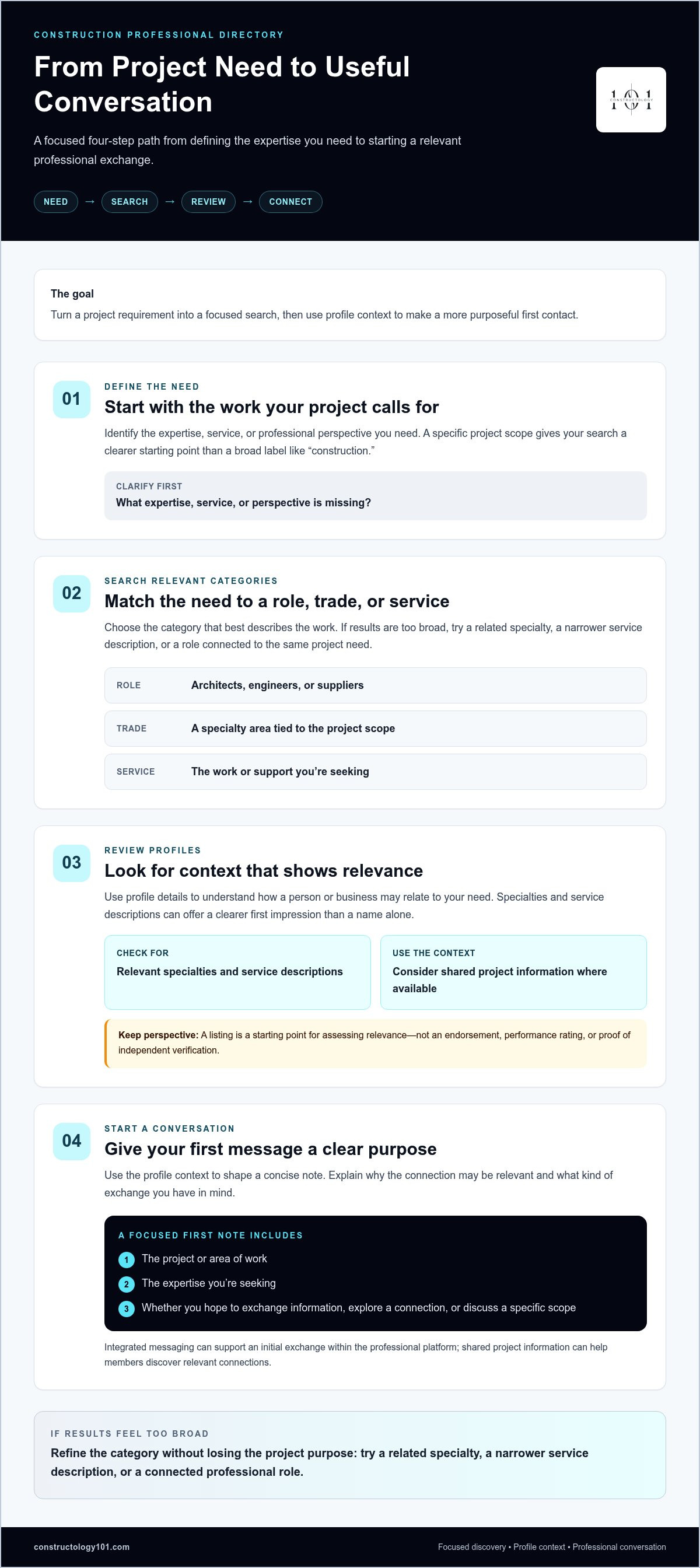
Interactive directory tools connect discovery, profile context, and communication, helping a relevant search lead naturally to a useful conversation. Follow a simple path:
- Define the need. Identify the expertise, service, or professional perspective your project calls for.
- Search relevant categories. Choose a trade, role, or service category that reflects the work.
- Review profiles. Look for details that help you understand how a person or business may relate to the need.
- Start a conversation. Share concise context and explain the connection you’re hoping to make.
Search by project need, trade, or professional role
Start with the work, not a broad label like “construction.” If you need a specialist for a defined part of a project, search for the related trade or service. If you’re assembling a team or seeking technical input, a professional role may be a better starting point. The project scope helps you choose terms that match the expertise you’re seeking.
If the initial results feel too broad, refine the search. Try a related specialty, a narrower service description, or a role connected to the same project need. This keeps the search flexible without losing its purpose. A construction industry professional directory is most useful when its categories translate a practical requirement into a focused discovery path.
Move from a relevant profile to a useful conversation
Use the profile context to shape your message before reaching out. Mention the project or area of work, describe the expertise you’re seeking, and explain whether you want to exchange information, explore a potential connection, or discuss a specific scope. A focused first note gives the other professional a clearer reason to respond than a generic introduction.
Integrated messaging can keep an initial exchange within the professional platform, while shared project information can help members discover relevant connections. These tools support communication; they don’t guarantee a hire, referral, or contract. The next step depends on the fit between the people and the work.
For more on building relationships through digital and professional connections, explore the modern construction professional network guide. To bring discovery and industry conversation together, explore Constructology 101’s interactive directory to connect with construction professionals and share project information.
Construction Directory Types: Member Lists, Search Tools, and Professional Networks
Directories can look similar at first glance, but they support different kinds of discovery. Some organize an association’s participating members. Others let users search a wider set of listings, while interactive professional networks add ways to continue a connection after a profile catches your attention. Choose based on whether you need a quick reference, focused search, or ongoing professional interaction.
| Directory type | Discovery method | Profile context | Interaction tools | Likely use |
|---|---|---|---|---|
| Static member list | Browse names or categories | Often basic company or member details | May provide contact information; features vary | Find a participating association member |
| Searchable directory | Filter or search listings by category or other available criteria | Listing details may help compare relevance | May link to contact channels | Target a specific trade, service, or business type |
| Interactive professional network | Search profiles and discover connections | Professional information can sit alongside shared project context | May include platform messaging and project sharing | Continue discovery through professional conversation |
These are general models, not guarantees of specific features. A construction industry professional directory may combine elements from more than one type, so compare the discovery and interaction tools it actually provides rather than relying on its label.
When a member directory is enough
A member list can meet a straightforward need: you know the association or category you want to browse and need basic details to identify a relevant company. Trade associations may organize participating members for membership purposes, while directories can support discovery by helping users find businesses and professionals. Some listings offer little beyond names and contact details, so don’t assume every directory includes messaging or project-sharing features.
When an interactive professional network adds value
A listing helps you view a potential connection. An interactive network can also give you a way to continue the exchange. Constructology 101 brings construction professionals together through an interactive directory, project information sharing, and integrated messaging. These tools support relationship-building across industry roles; they don’t guarantee a referral, contract, or project outcome. Their value is a clearer path from finding a profile to starting a relevant conversation.
Choose the format that matches your goal. If you only need to locate a participating member, a list may be enough. If you need to compare categorized profiles, a searchable directory may fit. If you want discovery and communication in one professional setting, an interactive network may be more useful. Before choosing, identify whether you need a simple reference, a way to narrow results, or tools to continue professional conversations.
How to Use a Construction Professional Directory More Effectively
A focused search starts before you open the directory. Translate the project requirement into clear criteria, then use those criteria to review listings and make purposeful contact. This repeatable approach helps you spend less time browsing broadly and more time assessing whether a potential connection relates to the work.
Build a focused search before browsing
Write down three things first: the project need, the specialty involved, and the kind of professional connection you want to make. Are you looking for a supplier, a technical perspective, or a specialty trade connected to a particular scope? Naming the goal helps you choose categories that reflect the work. It also prevents you from assuming that a company is a good fit simply because it operates in construction.
- Define the need: Describe the work or expertise you’re trying to find.
- Choose a category: Use the clearest available trade, role, or service label.
- Refine with purpose: If results are too broad, try a related specialty or more specific service term.
- Review context: Compare service descriptions, specialties, and relevant project information before reaching out.
Keep the search tied to scope. For example, a requirement involving a particular building system calls for a more specific search than browsing every construction-related listing. A construction industry professional directory can organize that discovery, but the usefulness of your results still depends on how clearly you define what you need.
Make the first message specific and professional
A strong opening message gives the recipient enough context to understand why you reached out. Briefly introduce the project or work area, connect their listed specialty to your search, and ask one practical question. Avoid vague requests that leave the recipient guessing about the project, the expertise sought, or the next step.
A focused message makes directory outreach easier to understand and easier to respond to. For instance, explain that you’re identifying professionals with experience related to a defined scope, then ask whether they’d be open to discussing that area of work. Keep the tone direct and professional, and share only the project details needed to make the conversation meaningful.
Directory discovery is a starting point, not a replacement for project-specific qualification. A profile can help you assess apparent relevance, but it doesn’t establish that a professional meets every project requirement or is suitable for a particular engagement. Continue with the evaluation your project calls for, using clear criteria such as relevant specialties, service descriptions, and fit with the scope.
Put this process into practice with Constructology 101’s interactive directory, where construction professionals can discover one another and build connections through project information sharing and messaging.
Connect Through Constructology 101’s Construction Industry Directory
Constructology 101 brings professional discovery and relationship-building into one construction-focused platform. It combines an interactive directory with a professional social network, giving members a place to find industry connections, share project information, and communicate through integrated messaging. The goal is practical: make it easier to move from discovering a relevant profile to beginning a professional exchange.
The community includes architects, engineers, specialty trades, and suppliers. That mix supports discovery across different roles in the construction process. An architect might want to connect with a supplier, an engineer may seek a conversation with a specialty trade, or a business may want its professional listing to be visible to others in the industry. A focused construction industry professional directory can help surface those connections, while the people involved decide how to take the relationship forward.
From industry discovery to professional connection
Directory listings offer a starting point: identify a role or specialty that relates to your work, then use the available professional context to decide whether a connection seems relevant. Constructology 101 extends that discovery with project information sharing and integrated messaging. Together, these features support a natural next step, from finding someone in the construction community to opening a conversation within the platform.
For example, a member who discovers a professional whose expertise relates to a project can use messaging to introduce the context and explain the reason for reaching out. Shared project information can help members continue discovering relevant connections and building relationships. These tools create a clearer route to industry conversations; they don’t promise a contract, referral, or project award.
The platform is designed for the construction community rather than a single discipline. Professionals across architecture, engineering, specialty trades, and supply can participate in the same industry-focused network, share relevant information, and connect across roles.
What Pioneer Membership is designed to provide
Pioneer Membership is for early participants who join while the platform is being built. It provides lifetime access to the platform’s tools, including the directory and features for networking, project information sharing, and messaging. For professionals who want to take part in a construction-focused community as it develops, it offers a way to stay connected through those tools over time.
Explore Constructology 101’s directory listings and Pioneer Membership to discover a construction professional network built around industry connections, shared project information, and direct communication.
Turn Your Next Search Into a Connection
Make your next industry search more intentional. Start with one professional connection you’d like to build, then choose a platform that can help you move from discovery to a meaningful exchange. A construction industry professional directory can be more than a place to look up names; it can be a starting point for expanding your professional circle.
Constructology 101 brings directory discovery together with a construction-focused professional social network. Members can share project information and communicate through integrated messaging, while Pioneer Membership gives early participants lifetime access to the platform tools. These features create more ways to take part in the community without promising a particular business outcome.
Explore Constructology 101’s directory and Pioneer Membership to start building industry connections. Take the next step at your own pace, and give your professional network room to grow.
Frequently Asked Questions
Can a construction industry professional directory guarantee that I will win a project?
No. A directory can help you become discoverable and begin relevant conversations, but it can’t promise contracts, referrals, or project awards. Outcomes depend on project requirements, timing, professional fit, and the relationships people build. Treat directory results as a way to identify possible connections, not as a prediction of project success. Continue using the qualification, proposal, and communication processes appropriate to the work you’re pursuing.
Is a construction professional directory only useful for contractors?
No. Architects, engineers, specialty trades, and suppliers can also use directories to discover people and services relevant to their work. For example, an engineer coordinating a project may need to find a specialty professional outside their usual circle. A directory can broaden the starting point for that search. Its practical value depends on whether the profiles and categories help different kinds of construction professionals find one another.
Can a directory replace referrals and industry relationships?
No. Use a directory alongside referrals and relationships you’ve already built. It can be especially useful when a project raises a need your immediate network doesn’t cover, such as a less familiar specialty or a new type of supplier. Once you identify a possible connection, bring your own professional judgment to the next steps. Direct discussion and project-specific evaluation remain important when deciding whether to work together.
What should I do if a directory search returns too many results?
Reduce the search to the project’s essential requirements, then compare a manageable shortlist. Note each candidate’s listed specialty, relevant service details, and connection to your need. This makes it easier to spot which profiles deserve a closer look and which don’t fit the scope. If results remain broad, adjust one search term or category at a time so you can see what improves relevance.
Can suppliers use a construction industry professional directory to connect with project teams?
Yes. Suppliers can use a construction industry professional directory to make their business easier for relevant industry professionals to discover. A clear profile can help explain the supplier’s area of expertise and the kinds of project needs it relates to. For example, describe the product or service category plainly rather than relying on a company name alone. Visibility may support an introduction, but it doesn’t guarantee inquiries, selection, or sales.
What happens after I find a relevant professional in a directory?
Review the profile, then choose a specific next step. Introduce yourself, explain why the person’s expertise caught your attention, and ask whether they’re open to a brief discussion about the project context. Keep a note of whom you contacted and what you discussed so you can follow up thoughtfully and avoid sending the same generic message twice. Let the conversation clarify whether there’s a useful connection.


